MLflow
MLflow is an open source platform for managing the end-to-end machine learning (ML) lifecycle, including experiment tracking, model packaging, and model registry. The MLflow tracking server stores per-run artifacts: model, weights, datasets, plots, and other run outputs, in an S3 compatible artifact store. When you integrate MLflow with Scality ARTESCA, the tracking server writes those artifacts to an ARTESCA bucket through the S3 API.
Prerequisites
The MLflow tracking server runs on any active Linux server with network access to the ARTESCA S3 endpoint. Reachable DNS
resolution (or an /etc/hosts entry) for the ARTESCA S3 endpoint must be in place on the MLflow host.
Set Up Resources for MLflow
These steps prepare the ARTESCA account, bucket, Identity and Access Management (IAM) identity, and access policy that the MLflow tracking server authenticates against.
Create an Account for MLflow.
Create a bucket for MLflow artifacts.
Create IAM users for MLflow.
Create an IAM policy to grant MLflow access to the artifact bucket.
The following policy grants MLflow least-privilege access: list bucket contents, read bucket location, and read, delete, and write objects.
Note
Replace each
<YOUR_BUCKET_NAME>placeholder in the policy with the actual name of your artifact bucket.{ "Version": "2012-10-17", "Statement": [ { "Effect": "Allow", "Action": [ "s3:PutObject", "s3:GetObject", "s3:DeleteObject", "s3:ListBucket", "s3:GetBucketLocation" ], "Resource": [ "arn:aws:s3:::<YOUR_BUCKET_NAME>", "arn:aws:s3:::<YOUR_BUCKET_NAME>/*" ] } ] }
Install Certificates
Install the ARTESCA Certificate Authority (CA) on the MLflow host so the tracking server’s S3 client trusts the ARTESCA S3 endpoint.
-
Copy
artesca_ca.pemto the MLflow host and note its absolute path. Export the path asAWS_CA_BUNDLEsoboto3trusts the certificate when MLflow uploads artifacts.Note
Replace
<YOUR_CERTIFICATE_PATH>with the absolute path to the certificate on the MLflow host.export AWS_CA_BUNDLE='/<YOUR_CERTIFICATE_PATH>/artesca_ca.pem'
Integrate MLflow with ARTESCA
Apply these steps to a Linux server that can reach the ARTESCA S3 endpoint.
Install MLflow and supporting dependencies.
sudo dnf install python3-pip git
python3 -m venv mlflow-env
source mlflow-env/bin/activate
pip install mlflow jupyterlab pandas scikit-learn boto3
Export the IAM credentials and the ARTESCA S3 endpoint as environment variables, then start the MLflow tracking server.
Note
Replace the
<YOUR_ACCESS_KEY>,<YOUR_SECRET_KEY>,<YOUR_ENDPOINT>, and<YOUR_BUCKET_NAME>placeholders with the real values.export AWS_ACCESS_KEY_ID='<YOUR_ACCESS_KEY>' export AWS_SECRET_ACCESS_KEY='<YOUR_SECRET_KEY>' export MLFLOW_S3_ENDPOINT_URL='https://<YOUR_ENDPOINT>' export AWS_CA_BUNDLE='/<YOUR_CERTIFICATE_PATH>/artesca_ca.pem' mlflow server \ --host 0.0.0.0 \ --port 8080 \ --artifacts-destination s3://<YOUR_BUCKET_NAME>Run an MLflow tracking client against the server to log a run and its artifacts.
The integration follows the standard MLflow quickstart pattern. Refer to the MLflow tracking quickstart at https://mlflow.org/docs/latest/getting-started/intro-quickstart for the standard client code, then point the client at the tracking server URI (Uniform Resource Identifier) you started in the previous step (
http://<MLFLOW_HOST>:8080).If the MLflow client runs from inside a Python script or Jupyter notebook on the same host, set
REQUESTS_CA_BUNDLEso the underlyingrequestslibrary trusts the ARTESCA CA certificate during artifact uploads.import os os.environ['REQUESTS_CA_BUNDLE'] = '/<YOUR_CERTIFICATE_PATH>/artesca_ca.pem' import mlflow from mlflow.models import infer_signature import pandas as pd from sklearn import datasets from sklearn.model_selection import train_test_split from sklearn.linear_model import LogisticRegression from sklearn.metrics import accuracy_score # Load the Iris dataset X, y = datasets.load_iris(return_X_y=True) # Split the data into training and test sets X_train, X_test, y_train, y_test = train_test_split( X, y, test_size=0.2, random_state=42 ) # Define the model hyperparameters params = { "solver": "lbfgs", "max_iter": 1000, "random_state": 8888, } # Train the model lr = LogisticRegression(**params) lr.fit(X_train, y_train) # Predict on the test set y_pred = lr.predict(X_test) # Calculate metrics accuracy = accuracy_score(y_test, y_pred) # Set our tracking server uri for logging mlflow.set_tracking_uri(uri="http://<MLFLOW_HOST>:8080") # Create a new MLflow Experiment mlflow.set_experiment("MLflow Quickstart S3") # Start an MLflow run with mlflow.start_run(): # Log the hyperparameters mlflow.log_params(params) # Log the accuracy metric mlflow.log_metric("accuracy", accuracy) # Set a tag that we can use to remind ourselves what this run was for mlflow.set_tag("Training Info", "Basic LR model for iris data") # Infer the model signature signature = infer_signature(X_train, lr.predict(X_train)) # Log the model model_info = mlflow.sklearn.log_model( sk_model=lr, artifact_path="iris_model", signature=signature, input_example=X_train, registered_model_name="tracking-quickstart-s3", ) # Load the model back for predictions as a generic Python Function model loaded_model = mlflow.pyfunc.load_model(model_info.model_uri) predictions = loaded_model.predict(X_test) iris_feature_names = datasets.load_iris().feature_names result = pd.DataFrame(X_test, columns=iris_feature_names) result["actual_class"] = y_test result["predicted_class"] = predictions print(result[:4])
Verify the Integration
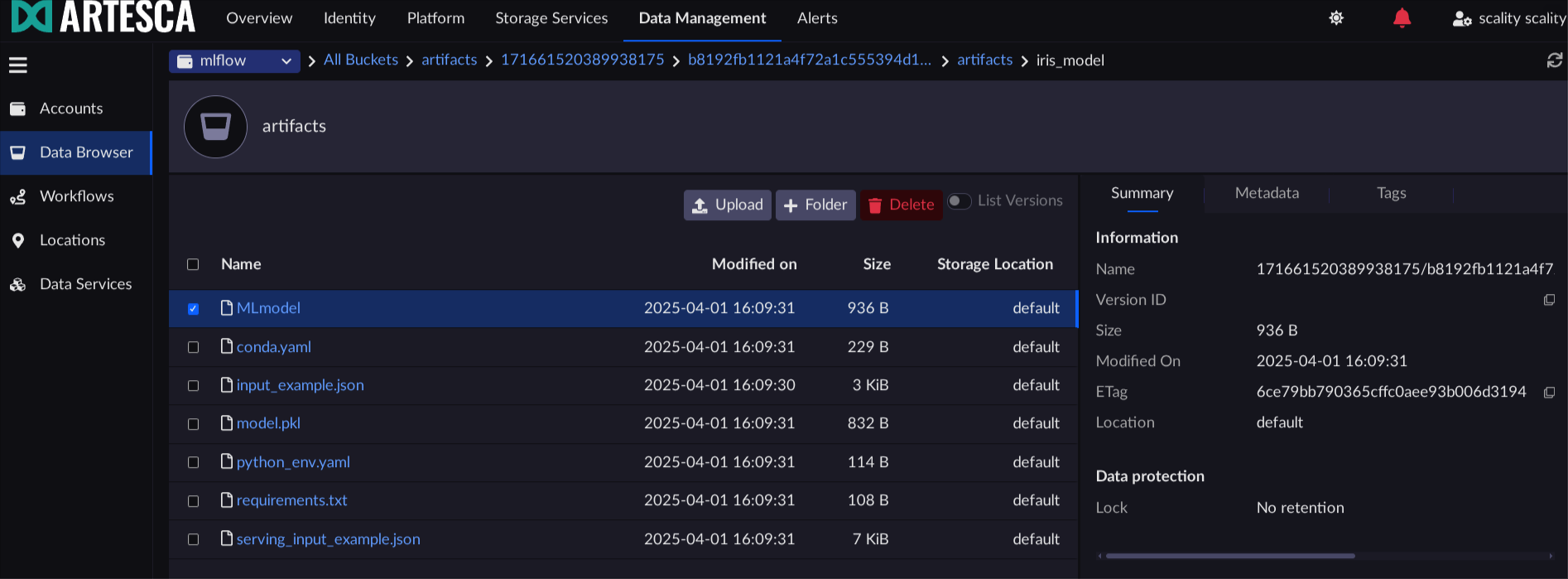
Confirm MLflow logged its artifacts into the target bucket on ARTESCA.
Open the MLflow web UI in your browser to
http://<MLFLOW_HOST>:8080.
Navigate to the run you just logged and inspect the Artifacts panel. Confirm the run artifacts (model files, metadata) are listed.
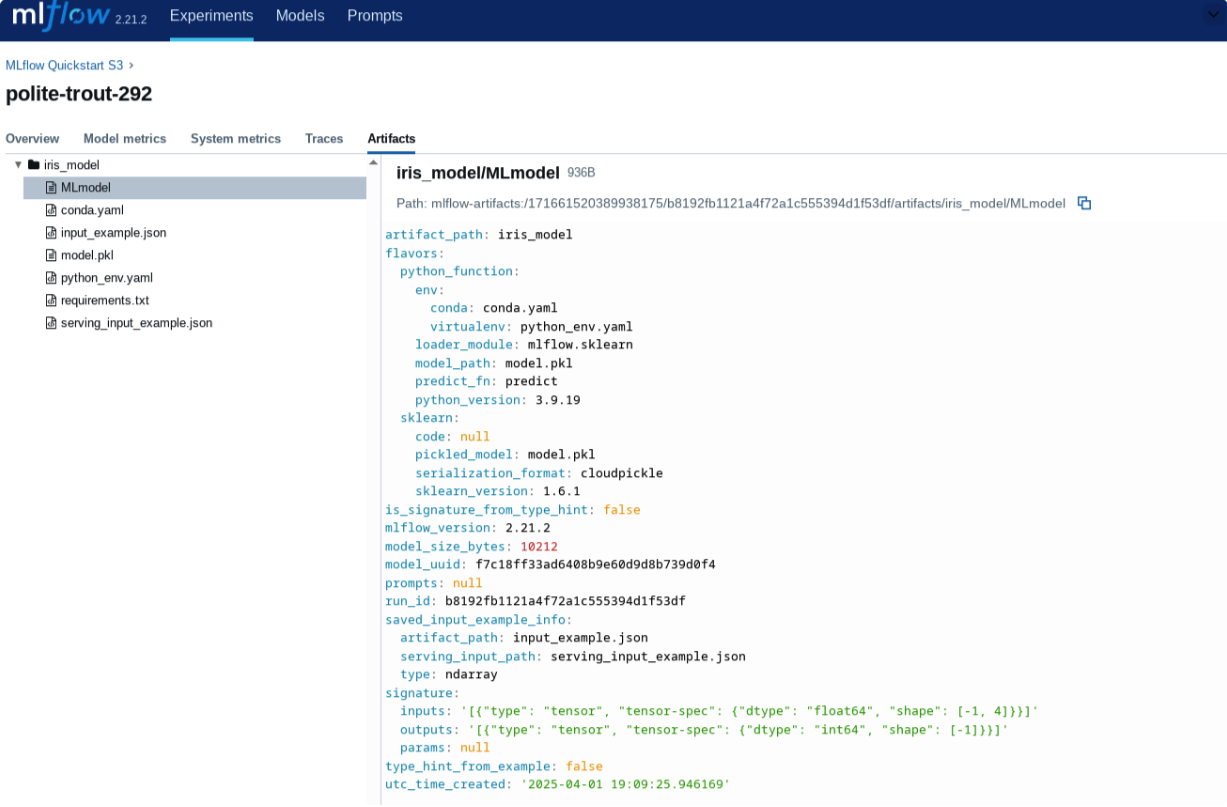
Access the ARTESCA UI.
Navigate to the artifact bucket and confirm the run-id-prefixed objects exist under the run’s prefix.