Apache Arrow
Apache Arrow is a cross-language development platform for in-memory data that enables high-performance analytics and efficient data exchange. It provides a standardized, columnar memory format designed for speed and interoperability in data science and machine learning workflows.
This document provides a comprehensive guide for setting up a secure Python environment on a Linux server to connect to
ARTESCA S3-compatible storage. The goal is to create a script that can scan a source bucket for .csv and .parquet files,
process them in memory using Apache Arrow, and write the resulting data into a destination bucket in the efficient Parquet format.
Prerequisites
An active Linux server (e.g., an AWS EC2,
t3.medium, instance running Ubuntu 22.04 LTS).
Prepare ARTESCA
Create an Account for Arrow.
Create 2 buckets (source and destination) to be used with Arrow.
Create IAM Users for Arrow.
Create an IAM policy to grant Arrow access to both S3 buckets and manage data.
To ensure your script has the necessary permissions without being overly permissive, apply the following JSON policy to the user or role associated with your access keys in the ARTESCA management interface.
This policy allows reading from the source bucket (
source_bucket) and writing to the destination bucket (destination_bucket).Note
Replace
source_bucketanddestination_bucketwith the actual names of your buckets in the policy below.{ "Version": "2012-10-17", "Statement": [ { "Sid": "AllowReadFromSourceBucket", "Effect": "Allow", "Action": [ "s3:GetObject", "s3:ListBucket" ], "Resource": [ "arn:aws:s3:::source_bucket", "arn:aws:s3:::source_bucket/*" ] }, { "Sid": "AllowWriteToDestinationBucket", "Effect": "Allow", "Action": [ "s3:PutObject", "s3:DeleteObject", "s3:AbortMultipartUpload", "s3:ListBucket" ], "Resource": [ "arn:aws:s3:::destination_bucket", "arn:aws:s3:::destination_bucket/*" ] } ] }
Install Certificates
Integrate Apache Arrow with ARTESCA
This section provides a step-by-step guide to setting up a secure Python environment and running the data processing script.
Set Up Ubuntu Environment
Ubuntu Specific Procedure
This section covers the creation of a new, Ubuntu isolated workspace for the ARTESCA integration.
Update your system and install necessary Python tools.
sudo apt-get update
sudo apt-get upgrade -y
sudo apt-get install -y python3-venv python3-pip
Create a Python Virtual Environment.
To isolate project dependencies, create a dedicated virtual environment.
# Create a project directory
mkdir artesca_arrow_project
cd artesca_arrow_project

# Create a Python virtual environment named 'env'
python3 -m venv env

# Activate the virtual environment
source env/bin/activate

# Your command prompt will now be prefixed with (env)
Install Python Dependencies.
With the virtual environment active, install Apache Arrow and the S3 filesystem library.
pip install pyarrow s3fs
Manage Credential Security
This section details how to securely manage credentials and the custom certificate without hardcoding them into scripts.
Using environment variables is the most secure way to provide credentials to your application. For convenience and persistence across sessions, add the following export commands to your ~/.bashrc file.
Open the file with a text editor.
vim ~/.bashrc
Add the following lines at the end of the file.
Note
Replace the placeholder values with your actual data.
# ~/.bashrc

# --- Artesca S3 Configuration ---

# 1. Your S3 Access Key ID
export AWS_ACCESS_KEY_ID="YOUR_ACCESS_KEY_ID"

# 2. Your S3 Secret Access Key
export AWS_SECRET_ACCESS_KEY="YOUR_SECRET_ACCESS_KEY"

# 3. Your Artesca S3 Endpoint URL (including the https:// scheme)
export AWS_ENDPOINT_URL="https://s3.my-company.com"

# 4. The absolute path to your custom CA certificate on the Linux server instance
export AWS_CA_BUNDLE="/home/ubuntu/artesca-ca.pem"
Save the file and load the variables into your current terminal session.
source ~/.bashrc
Create the Processing Script
The following Python script performs the core task. It is designed to be robust, secure, and capable of handling multiple file formats.
Create a file named process_artesca_data.py and paste in the following code.
# process_artesca_data.py
import os
import pyarrow as pa
import pyarrow.parquet as pq
import pyarrow.csv as pv
from pyarrow.fs import S3FileSystem, FileSelector
from datetime import datetime, UTC

# --- Configuration (from environment variables) ---
SOURCE_BUCKET = "s3arrow"
DESTINATION_BUCKET = "s3arrow2"

def main():
    """
    Connects to S3, scans for .parquet and .csv files in a source bucket,
    adds a new column (labeling), and writes each result to a destination bucket
    in Parquet format.
    """
    print("--- Starting Secure Multi-Format Data Processing ---")

    endpoint_url = os.getenv("AWS_ENDPOINT_URL")
    if not endpoint_url:
        print("Error: AWS_ENDPOINT_URL environment variable is not set.")
        return

    if not endpoint_url.startswith(('http://', 'https://')):
        print(f"INFO: Prepending 'https://' to endpoint URL for robustness. Original: '{endpoint_url}'")
        endpoint_url = f"https://{endpoint_url}"
        print(f"INFO: Final Endpoint URL used: '{endpoint_url}'")

    try:
        s3_fs = S3FileSystem(endpoint_override=endpoint_url)
        print("Successfully created S3FileSystem. Credentials and config loaded from environment.")
    except Exception as e:
        print(f"Error creating S3FileSystem: {e}")
        return

    print(f"\nScanning for files in source bucket: '{SOURCE_BUCKET}'...")
    try:
        file_selector = FileSelector(SOURCE_BUCKET, recursive=True)
        files_to_process = s3_fs.get_file_info(file_selector)
        files_to_process = [f for f in files_to_process if f.is_file]
    except Exception as e:
        print(f"Error scanning bucket '{SOURCE_BUCKET}': {e}")
        return

    if not files_to_process:
        print(f"No files found in bucket '{SOURCE_BUCKET}'. Nothing to process. Exiting.")
        return

    print(f"Found {len(files_to_process)} file(s) to process.")

    successful_files = 0
    for file_info in files_to_process:
        input_path = file_info.path
        base_filename = input_path.split('/', 1)[-1]

        print(f"\nProcessing file: s3://{input_path}")

        try:
            table = None
            if input_path.lower().endswith('.parquet'):
                print("  -> Detected Parquet file. Using Parquet reader.")
                table = pq.read_table(input_path, filesystem=s3_fs)

            elif input_path.lower().endswith('.csv'):
                print("  -> Detected CSV file. Using CSV reader.")
                with s3_fs.open_input_file(input_path) as f:
                    table = pv.read_csv(f)

            else:
                print(f"  -> Skipping unsupported file type: {input_path}")
                continue

            processing_timestamp = datetime.now(UTC).isoformat()
            labels_array = pa.array([processing_timestamp] * table.num_rows, type=pa.string())
            labeled_table = table.add_column(table.num_columns, "processing_ts", labels_array)

            output_filename_stem = os.path.splitext(base_filename)[0]
            output_path = f"{DESTINATION_BUCKET}/{output_filename_stem}.parquet"

            print(f"  -> Saving as Parquet to: s3://{output_path}")
            pq.write_table(labeled_table, output_path, filesystem=s3_fs)
            successful_files += 1

        except Exception as e:
            print(f"  -> ERROR processing file {input_path}: {e}")
            print(f"  -> Skipping this file.")

    print(f"\n--- Batch processing finished. ---")
    print(f"Successfully processed and saved {successful_files}/{len(files_to_process)} files.")

if __name__ == "__main__":
    main()
Execute the Processing Script
Prepare the source bucket.
Ensure that your source bucket (
source_bucket) contains some sample.csvand/or.parquetfiles for the script to process.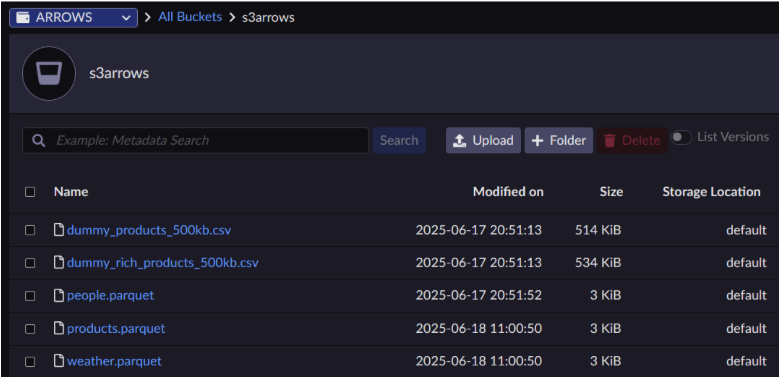
Run the script.
Execute the script from your project directory, ensuring your virtual environment is active.
# The correct execution order
source ~/.bashrc
source env/bin/activate
python3 process_artesca_data.py
Verify the output.
The script will print its progress to the terminal. Upon successful completion, you will see a final message confirming the number of processed files.
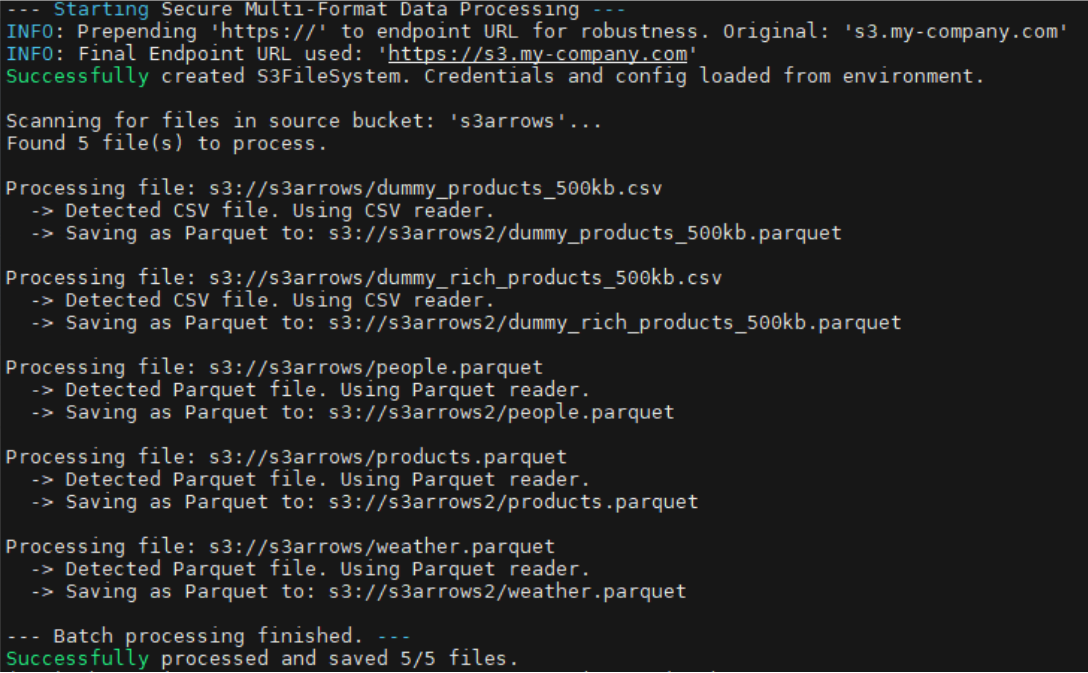
You can then check your destination bucket (
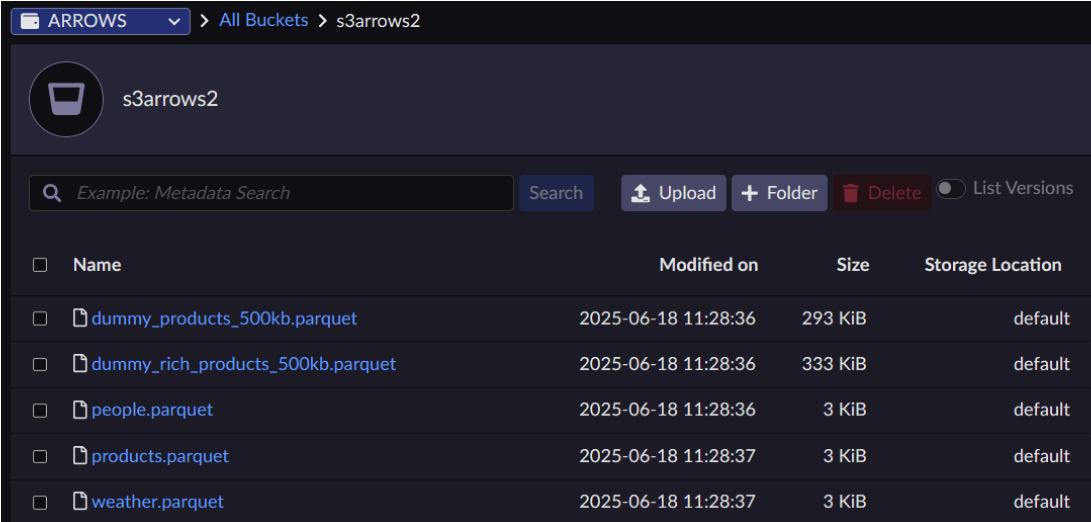
destination_bucket). It will contain the processed files, all converted to the Parquet format, with the original filenames preserved (e.g.,my_data.csvwill becomemy_data.parquet).