Apache Airflow
Apache Airflow is a platform for programmatically authoring, scheduling, and monitoring workflows.
Airflow Features |
Description |
|---|---|
Directed Acyclic Graphs (DAGs) |
Workflows are defined as DAGs using Python code with each DAG representing a collection of tasks with dependencies between them. |
Operators |
These are the building blocks of Airflow that represent a single task in a workflow. Common operators include:
|
Web UI |
Airflow provides a comprehensive web interface to monitor and manage workflows, view logs, and track task execution. |
Scheduler |
The component responsible for triggering scheduled workflows and submitting tasks to the executor. |
Executors |
These determine how tasks are executed. Options include:
|
Metadata Database |
Stores information about the state of tasks and DAGs. Supports PostgreSQL, MySQL, and SQLite. |
Task Dependencies |
You can define complex dependencies between tasks (A runs before B, C runs only if A succeeds, etc.). |
Hooks and Connections |
For connecting to external systems and databases. |
Object storage is an experimental feature in Airflow. Airflow provides a generic abstraction
on top of object stores, like S3, GCS, and Azure Blob Storage. This abstraction allows you to
use a variety of object storage systems in your DAGs without having to change your code to deal
with every different object storage system. In addition, it allows you to use most of the
standard Python modules, like shutil, that can work with file-like objects.
Prerequisites
Airflow installed.
Limitations
Object storage is still an experimental feature.
To enable S3 support, you must install the
apache-airflow-providers-amazon[s3fs]package. This is necessary because it relies onaiobotocore, which is not included by default to prevent potential dependency conflicts withbotocore.
Integration with ARTESCA
Create an Account for Airflow.
Create a Bucket to be used with Airflow.
Create IAM Users for Airflow.
Create an IAM policy to grant Airflow access to the S3 bucket and manage data.
Note
Replace
bucketnamewith your bucket’s name.{ "Version": "2012-10-17", "Statement": [ { "Sid": "SecureBucketPolicy0", "Effect": "Allow", "Action": [ "s3:PutObject", "s3:GetObject", "s3:DeleteObject", "s3:GetBucketLocation", "s3:GetBucketVersioning", "s3:GetBucketObjectLockConfiguration" ], "Resource": [ "arn:aws:s3:::bucketname/*", "arn:aws:s3:::bucketname" ] }, { "Sid": "SecureBucketPolicy1", "Effect": "Allow", "Action": [ "s3:ListAllMyBuckets", "s3:ListBucket" ], "Resource": "*" } ] }
Install the ARTESCA Root Certificate
Copy the
artesca-ca.pemto the host.Find the certifi CA bundle path. Open a terminal in your activated venv and run:
python -c "import certifi; print(certifi.where())"
This will output the full path to certifi’s
cacert.pemfile (for example,/home/ubuntu/myenv/lib/python3.12/site-packages/certifi/cacert.pem).Create a combined CA bundle. Concatenate the certifi bundle and your local
.pemfile into a new file. For example: if your local file is/path/to/your/local-ca.pemand the certifi path from the previous step is/path/to/certifi/cacert.pem:cat /path/to/certifi/cacert.pem /path/to/your/local-ca.pem > /path/to/your/combined_bundle.pem
Note
Ensure the resulting
/path/to/your/combined_bundle.pemfile is accessible by your Airflow processes.Tell the libraries to use the combined bundle via environment variables. You can do this via environment variables (easiest for system-wide effect within the environment) or code/connection configuration.
# For requests library (often used by other providers)
export REQUESTS_CA_BUNDLE=/path/to/your/combined_bundle.pem

# For boto3/botocore (used by the S3Hook)
export AWS_CA_BUNDLE=/path/to/your/combined_bundle.pem
Configure ARTESCA as a Backend for DAG
Create an S3 connection.
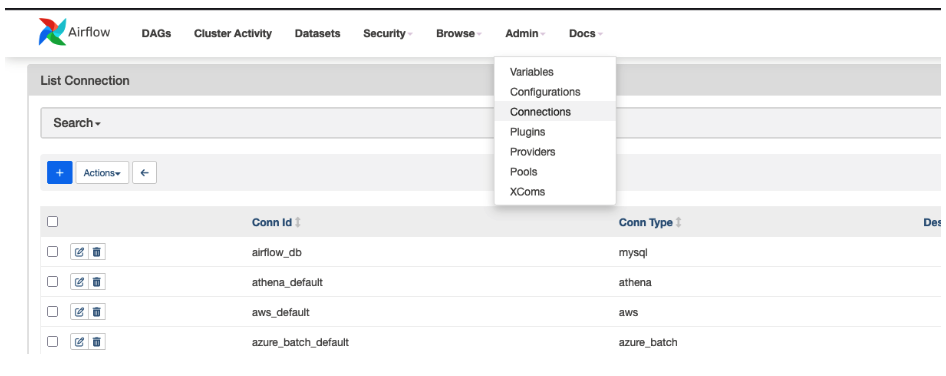
Navigate to Top Menu > Admin > Connections.
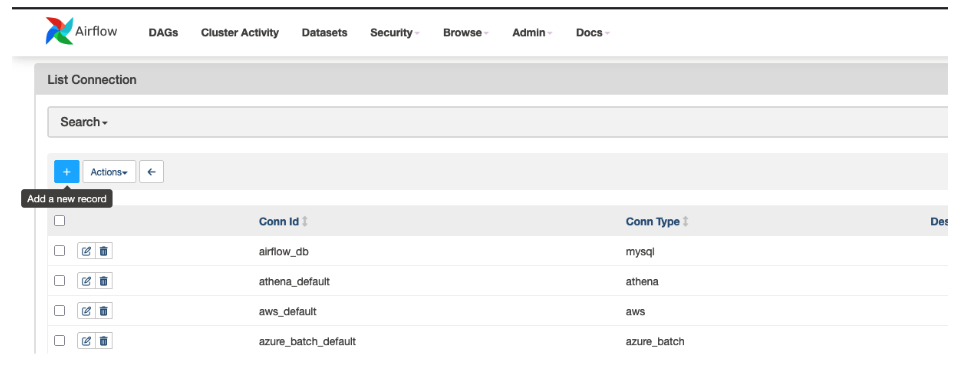
Click + to create the new connection.
Select Amazon Web Services.
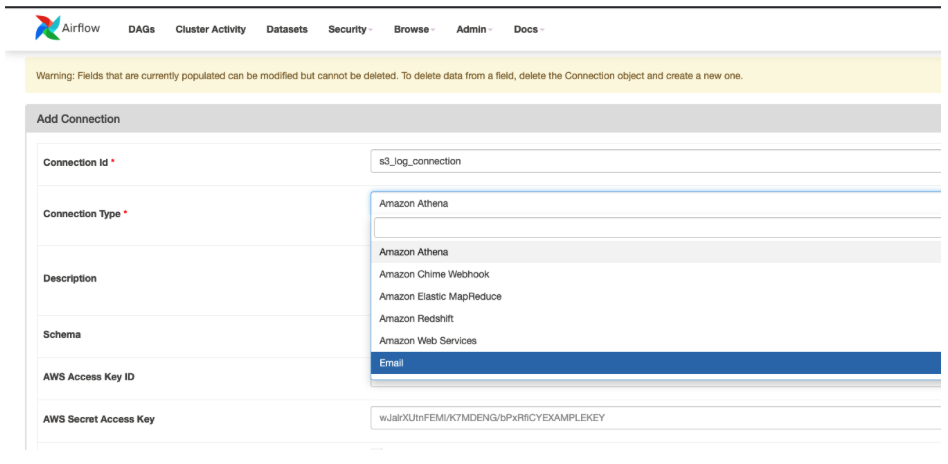
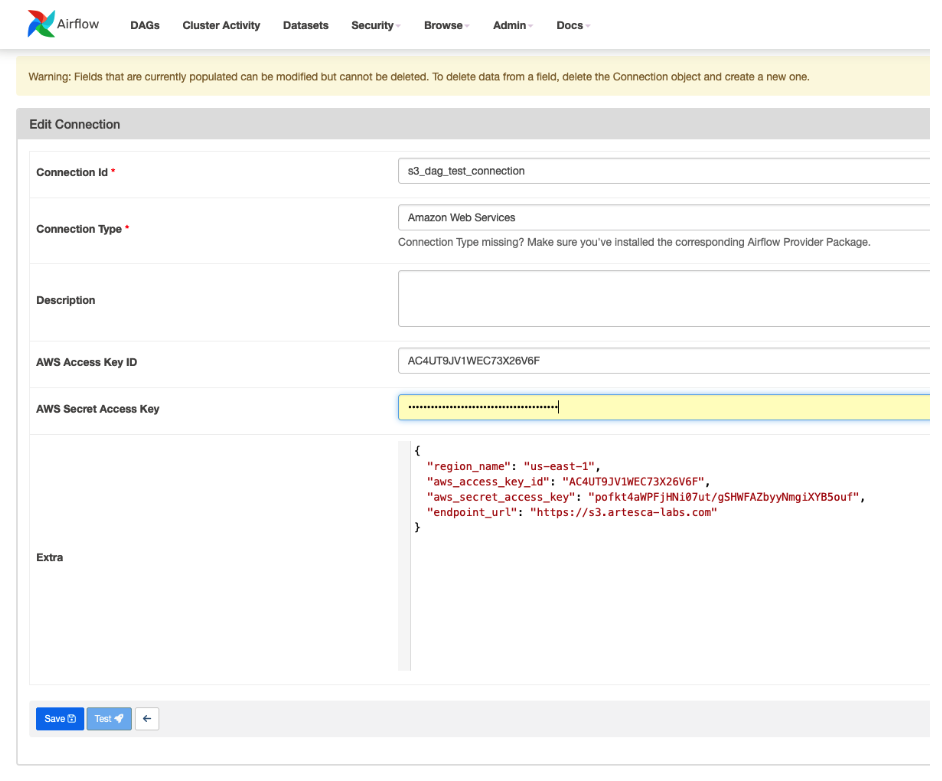
Fill in the access data for ARTESCA in the extras field.
{
  "region_name": "us-east-1",
  "aws_access_key_id": "<ARTESCA Access Key>",
  "aws_secret_access_key": "<ARTESCA Secret Key>",
  "endpoint_url": "<ARTESCA S3 Endpoint>"
}
Create a new DAG with the following content and save it in the
dagsfolder inside the Airflow home directory ass3_third_party_test.import os from datetime import datetime, timedelta from airflow.models.dag import DAG from airflow.providers.amazon.aws.hooks.s3 import S3Hook from airflow.operators.python import PythonOperator from airflow.operators.bash import BashOperator from airflow.utils.trigger_rule import TriggerRule # --- Configuration --- S3_CONN_ID = "s3_dag_test_connection" # Connection ID created in Airflow UI for DAG tests S3_BUCKET_NAME = "airflowbucket" # Bucket for test data (create this bucket) S3_TEST_KEY = "test_uploads/my_test_file.txt" # Object key (path) in the bucket LOCAL_TEST_FILE_PATH = "/tmp/airflow_s3_test_file.txt" # Temporary local file path TEST_FILE_CONTENT = f"Hello from Airflow! Timestamp: {datetime.now().isoformat()}" # --- /Configuration --- def upload_to_s3(**context): """Creates a local file and uploads it to S3.""" print(f"Creating local file: {LOCAL_TEST_FILE_PATH}") with open(LOCAL_TEST_FILE_PATH, "w") as f: f.write(TEST_FILE_CONTENT) print(f"File content: {TEST_FILE_CONTENT}") print(f"Uploading {LOCAL_TEST_FILE_PATH} to s3://{S3_BUCKET_NAME}/{S3_TEST_KEY}") s3_hook = S3Hook(aws_conn_id=S3_CONN_ID) s3_hook.load_file( filename=LOCAL_TEST_FILE_PATH, key=S3_TEST_KEY, bucket_name=S3_BUCKET_NAME, replace=True, ) print("Upload complete.") def list_s3_bucket_keys(**context): """Lists keys in the specified S3 bucket/prefix.""" print(f"Listing keys in bucket: {S3_BUCKET_NAME}") s3_hook = S3Hook(aws_conn_id=S3_CONN_ID) keys = s3_hook.list_keys(bucket_name=S3_BUCKET_NAME, prefix="test_uploads/") print(f"Keys found under prefix 'test_uploads/': {keys}") if not keys or S3_TEST_KEY not in keys: raise ValueError(f"Test key {S3_TEST_KEY} not found after upload!") def download_from_s3(**context): """Downloads the test file back from S3.""" local_download_path = f"{LOCAL_TEST_FILE_PATH}.downloaded" print(f"Downloading s3://{S3_BUCKET_NAME}/{S3_TEST_KEY} to {local_download_path}") s3_hook = S3Hook(aws_conn_id=S3_CONN_ID) downloaded_file = s3_hook.download_file( key=S3_TEST_KEY, bucket_name=S3_BUCKET_NAME, local_path=os.path.dirname(local_download_path), preserve_file_name=False, ) expected_download_path = os.path.join( os.path.dirname(local_download_path), os.path.basename(S3_TEST_KEY) ) print(f"Checking existence of downloaded file: {expected_download_path}") if not os.path.exists(expected_download_path): raise FileNotFoundError(f"Failed to download file to {expected_download_path}") print(f"File downloaded successfully to {expected_download_path}") with open(expected_download_path, "r") as f: content = f.read() print(f"Downloaded content: {content}") def delete_s3_object(**context): """Deletes the test object from S3.""" print(f"Deleting object s3://{S3_BUCKET_NAME}/{S3_TEST_KEY}") s3_hook = S3Hook(aws_conn_id=S3_CONN_ID) s3_hook.delete_objects(bucket=S3_BUCKET_NAME, keys=[S3_TEST_KEY]) print("S3 object deleted.") default_args = { 'owner': 'airflow', 'depends_on_past': False, 'email_on_failure': False, 'email_on_retry': False, 'retries': 1, 'retry_delay': timedelta(minutes=2), 'start_date': datetime(2023, 1, 1), } with DAG( dag_id='s3_third_party_test', default_args=default_args, description='Test interaction with 3rd party S3 storage', schedule_interval=None, catchup=False, tags=['s3', 'test', 'third-party'], ) as dag: task_upload_to_s3 = PythonOperator( task_id='upload_to_s3', python_callable=upload_to_s3, ) task_list_s3_keys = PythonOperator( task_id='list_s3_keys', python_callable=list_s3_bucket_keys, ) task_download_from_s3 = PythonOperator( task_id='download_from_s3', python_callable=download_from_s3, ) task_cleanup_local_files = BashOperator( task_id='cleanup_local_files', bash_command=f"rm -f {LOCAL_TEST_FILE_PATH} {LOCAL_TEST_FILE_PATH}.downloaded " f"{os.path.join(os.path.dirname(LOCAL_TEST_FILE_PATH), os.path.basename(S3_TEST_KEY))}", trigger_rule=TriggerRule.ALL_DONE, ) task_delete_s3_object = PythonOperator( task_id='delete_s3_object', python_callable=delete_s3_object, trigger_rule=TriggerRule.ALL_DONE, ) task_upload_to_s3 >> task_list_s3_keys >> task_download_from_s3 task_download_from_s3 >> [task_cleanup_local_files, task_delete_s3_object]After a few moments, the newly created DAG will appear in the DAG list.
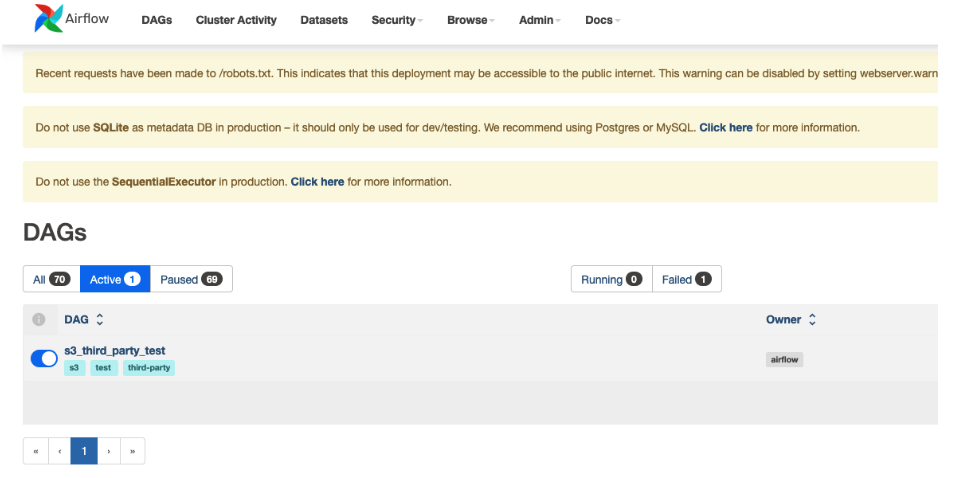
Click the newly created DAG to view it.
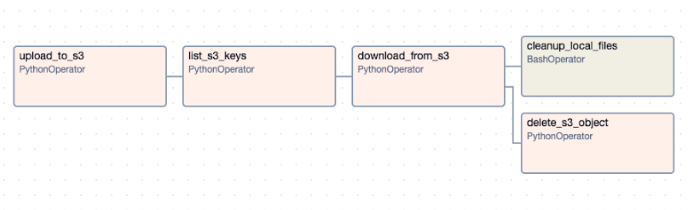
Run the Workflow
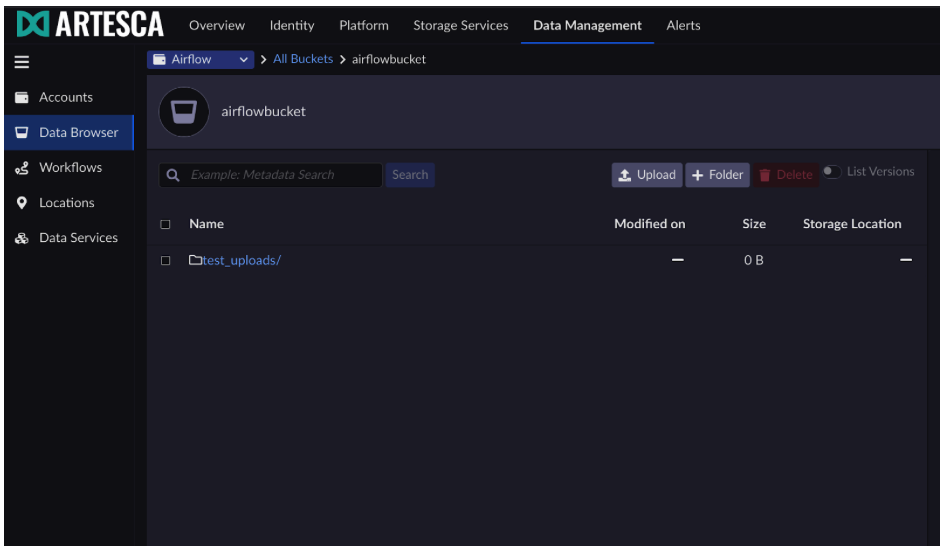
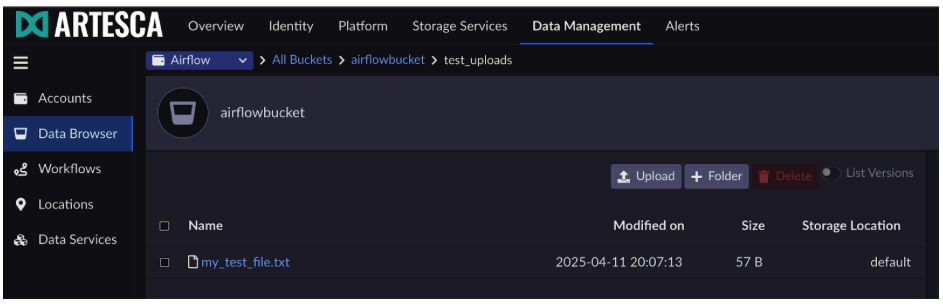
After running the workflow in Airflow, you can see the data being created in ARTESCA.