

Bodo.ai
Bodo.ai is a high-performance analytics engine that transforms standard Python into massively parallelized machine code using just-in-time compilation. It empowers data teams to scale Python workloads seamlessly across distributed compute environments without rewriting code.
Prerequisites
An active Linux server.
Prepare your ARTESCA Environment
Create an Account for Bodo.ai.
Create two buckets (source and destination) to be used with Bodo.ai.
Create IAM Users for Bodo.ai.
Create an IAM policy to grant Bodo.ai access to both S3 buckets and manage data.
To ensure your script has the necessary permissions without being overly permissive, apply the following JSON policy to the user or role associated with your access keys in the ARTESCA management interface.
This policy allows reading from the source bucket (
s3bodo), and writing to the destination bucket (s3bodo2).Note
Replace
s3bodoands3bodo2with the actual names of your buckets in the policy below.{ "Version": "2012-10-17", "Statement": [ { "Sid": "AllowListBucketA", "Effect": "Allow", "Action": [ "s3:ListBucket" ], "Resource": "arn:aws:s3:::s3bodo" }, { "Sid": "AllowReadFromBucketA", "Effect": "Allow", "Action": [ "s3:GetObject" ], "Resource": "arn:aws:s3:::s3bodo/*" }, { "Sid": "AllowWriteToBucketB", "Effect": "Allow", "Action": [ "s3:PutObject", "s3:DeleteObject" ], "Resource": "arn:aws:s3:::s3bodo2/*" }, { "Sid": "AllowListBucketB", "Effect": "Allow", "Action": [ "s3:ListBucket" ], "Resource": "arn:aws:s3:::s3bodo2" } ] }
Install Certificates
Integrate Bodo.ai with ARTESCA
Apply the following steps to an active Linux server with access to the ARTESCA instance.
Update the system, and install required packages.
sudo apt update && sudo apt install -y docker.io python3-venv
Add Docker permissions.
sudo usermod -aG docker $USER
newgrp docker
Install Docker Compose V2.
sudo curl -SL https://github.com/docker/compose/releases/download/v2.20.2/docker-compose-linux-x86_64 \
  -o /usr/local/bin/docker-compose
sudo chmod +x /usr/local/bin/docker-compose
Check the Docker Compose installation.
docker compose --version
Create a directory for Bodo.ai and navigate into it.
mkdir -p ~/docker_bodo.ai-v1 && cd ~/docker_bodo.ai-v1
Add the CA root certificate to the directory.
Note
Replace
/path/to/artesca-ca.pemwith the actual path to the CA root certificate.cp /path/to/artesca-ca.pem ./
Create a
docker-compose.ymlfile with the following content. Replace placeholders (YOUR_ACCESS_KEY,YOUR_SECRET_KEY, andYOUR_ENDPOINT) with actual values.services: bodo-etl: image: python:3.10-slim container_name: bodo-etl volumes: - ./etl_bodo.py:/app/etl_bodo.py - ./artesca-ca.pem:/etc/ssl/certs/artesca-ca.pem:ro environment: - AWS_ACCESS_KEY_ID=<YOUR_ACCESS_KEY> - AWS_SECRET_ACCESS_KEY=<YOUR_SECRET_KEY> - AWS_CA_BUNDLE=/etc/ssl/certs/artesca-ca.pem - AWS_ENDPOINT_URL=<YOUR_ENDPOINT> working_dir: /app entrypoint: ["/bin/bash", "-c"] command: > "pip install boto3 pandas pyarrow boto3 s3fs bodo && python etl_bodo.py"Create a Python file named
etl_bodo.pywith the following content.Note
Replace
s3bodoands3bodo2with the actual names of your buckets in the script below.import os import boto3 import pandas as pd import pyarrow as pa import pyarrow.parquet as pq import warnings from datetime import datetime import boto3 import boto3.session import bodo # Setup logging print("[INFO] \U0001F4C2 Listing files in bucket: s3bodo") s3 = boto3.client('s3', endpoint_url=os.environ['AWS_ENDPOINT_URL']) bucket_a = 's3bodo' bucket_b = 's3bodo2' response = s3.list_objects_v2(Bucket=bucket_a) files = [obj['Key'] for obj in response.get('Contents', [])] print(f"[INFO] \u2705 Found {len(files)} files: {files}\n") @bodo.jit def transform_with_bodo(df): df['bodo_tag'] = "processed" df['bodo_time'] = datetime.utcnow().strftime("%Y-%m-%d %H:%M:%S") return df def process_file(key): print(f"[INFO] \U0001F504 Processing file: {key}") print(datetime.utcnow().strftime("%Y-%m-%d %H:%M:%S")) local_input = f"/tmp/{key}" local_output = f"/tmp/tagged_{key}" # Clean previous files if os.path.exists(local_output): print(f"[INFO] Deleting previous file at '{local_output}'") os.remove(local_output) # Download file print(f"[INFO] \u2B07\uFE0F Downloading file '{key}'") s3.download_file(bucket_a, key, local_input) # Tag and save print(f"[INFO] \U0001F9E0 Tagging file with Bodo: {local_input}") df = pd.read_parquet(local_input) if key.endswith(".parquet") else pd.read_csv(local_input) df = transform_with_bodo(df) print(f"[INFO] \U0001F4BE Saving tagged file to: {local_output}") if key.endswith(".parquet"): df.to_parquet(local_output, index=False) else: df.to_csv(local_output, index=False) # Upload print(f"[INFO] \u2B06\uFE0F Uploading '{local_output}' to bucket '{bucket_b}'") s3.upload_file(local_output, bucket_b, key) print("[INFO] \u2705 Upload complete.\n") for key in files: process_file(key) print("\n\u2705 All files processed and uploaded.")Run the process.
docker compose up --remove-orphans
Go to the ARTESCA UI. Download the
*.csvand*.parquetfiles froms3bodo2.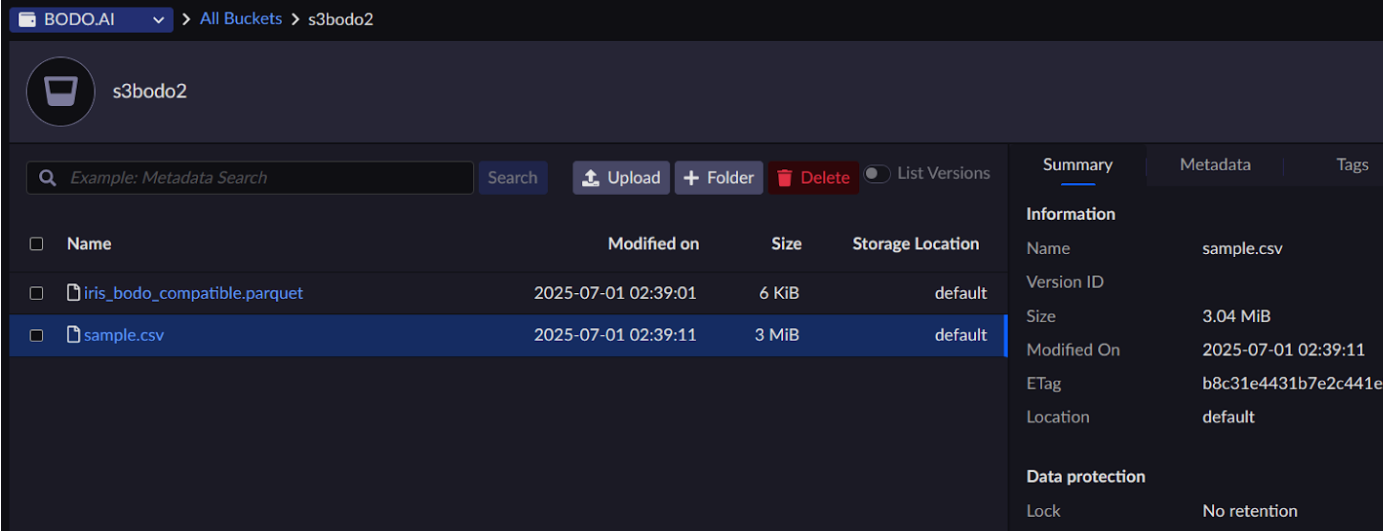
Check that the CSV file has two new columns
bodo_tag, andbodo_time.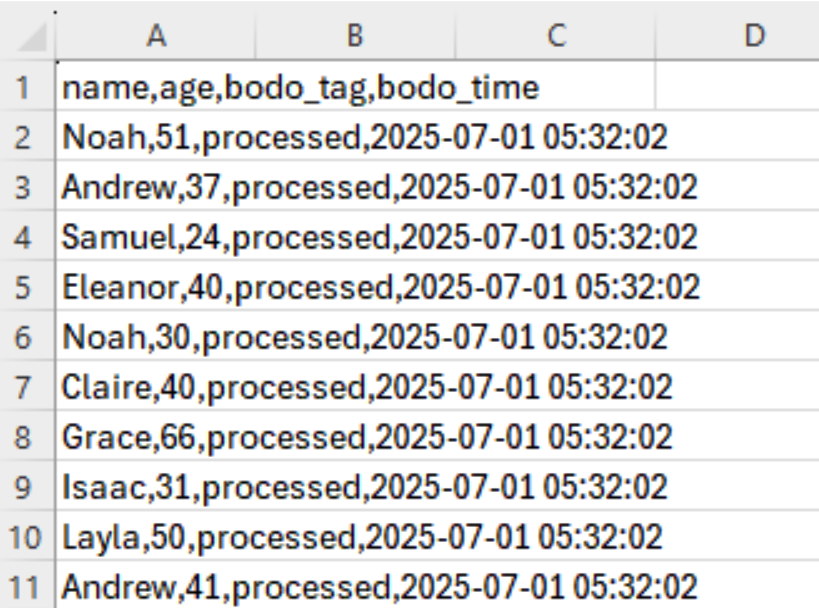
Check that the Parquet file has two new columns
bodo_tag, andbodo_time.


