Jax
Jax is a high-performance numerical computing library that provides composable transformations of Python and NumPy programs. It is designed for high-performance machine learning research. When integrated with ARTESCA, Jax allows for seamless data processing and the ability to save and load machine learning models directly from S3-compatible object storage.
Prerequisites
An active Linux server.
Prepare ARTESCA
Create an Account for Jax.
Create a bucket (e.g.,
bucket-jax) to store data and models.Create IAM Users for Jax.
Create an IAM policy to grant Jax access to the S3 bucket.
Apply the following JSON policy to the user associated with your access keys. This policy allows Jax to manage objects and retrieve bucket location data.
Note
Replace
bucketnamewith your actual bucket name.{ "Version": "2012-10-17", "Statement": [ { "Effect": "Allow", "Action": [ "s3:PutObject", "s3:GetObject", "s3:ListBucket", "s3:GetBucketLocation" ], "Resource": [ "arn:aws:s3:::bucketname", "arn:aws:s3:::bucketname/*" ] } ] }
Install Certificates
Integrate Jax with ARTESCA
Apply these steps to a Linux server with access to the ARTESCA instance.
Install the required system and Python dependencies.
sudo dnf install pip
pip install jax flax boto3 s3fs pandas sklearn
Create a file named
jax_artesca.pywith the following content.Note
Replace the
Your_Access_Key,Your_Secret_Key,Your_Endpoint, andYour_Certificate_Pathplaceholders with the real values.# Load modules and variables. import s3fs import jax import pandas as pd import jax.numpy as jnp from sklearn.preprocessing import LabelEncoder from sklearn.model_selection import train_test_split import flax.linen as nn import flax.serialization # Connect to ARTESCA S3 # This section utilizes the s3fs library to bridge the gap # between your local environment and the S3 storage backend. fs = s3fs.S3FileSystem( anon=False, key='<Your_Access_Key>', secret='<Your_Secret_Key>', client_kwargs={ 'endpoint_url': 'https://<YOUR_ENDPOINT>.com', 'verify': '/<YOUR_CERTIFICATE_PATH>/artesca-ca.pem' } ) # Read CSV # This section reads the ``bucket-jax/iris.csv`` file from |project|. # Sample data: ``iris.csv`` is a 50-sample machine learning dataset introduced by R.A. Fisher in 1936, featuring 50 samples # from each of three Iris flower species. with fs.open('bucket-jax/iris.csv', 'rb') as f: df = pd.read_csv(f) # Preprocess the data # This section handles data preparation. # The preprocessing stage converts raw CSV data into jax.numpy arrays. This is critical for leveraging JAX's hardware acceleration (XLA), # ensuring that the data is ready for high-performance tensor operations. features = df.iloc[:, :-1].values labels = LabelEncoder().fit_transform(df['species']) # Split and convert to jax.numpy X_train, X_test, y_train, y_test = train_test_split(features, labels, test_size=0.2) X_train = jnp.array(X_train) y_train = jnp.array(y_train) # Define a Simple MLP Model # This section defines the model as a flax.linen.Module. # It uses a simple MLP (Multi-Layer Perceptron) architecture. # The @nn.compact decorator allows for clean definition of layers within the __call__ method. # The final layer output is set to 3 to accommodate the iris dataset classes (setosa, versicolor, and virginica). class MLP(nn.Module): @nn.compact def __call__(self, x): x = nn.Dense(16)(x) x = nn.relu(x) x = nn.Dense(3)(x) return x model = MLP() # This section initializes parameters and saves the model on |project|. # Once training is complete, the flax.serialization.to_bytes utility converts the model's parameter # dictionary into a binary format (MessagePack), which is then written to the S3 bucket as a .msgpack file. # This allows for easy versioning and portability of trained models. rng = jax.random.PRNGKey(0) params = model.init(rng, X_train[:1]) # Save Parameters serialized = flax.serialization.to_bytes(params) with fs.open('bucket-jax/iris_model.msgpack', 'wb') as f: f.write(serialized) print("Model saved to S3")Run the script.
python3 jax_artesca.py
Verification
Access the ARTESCA management interface.
Navigate to the
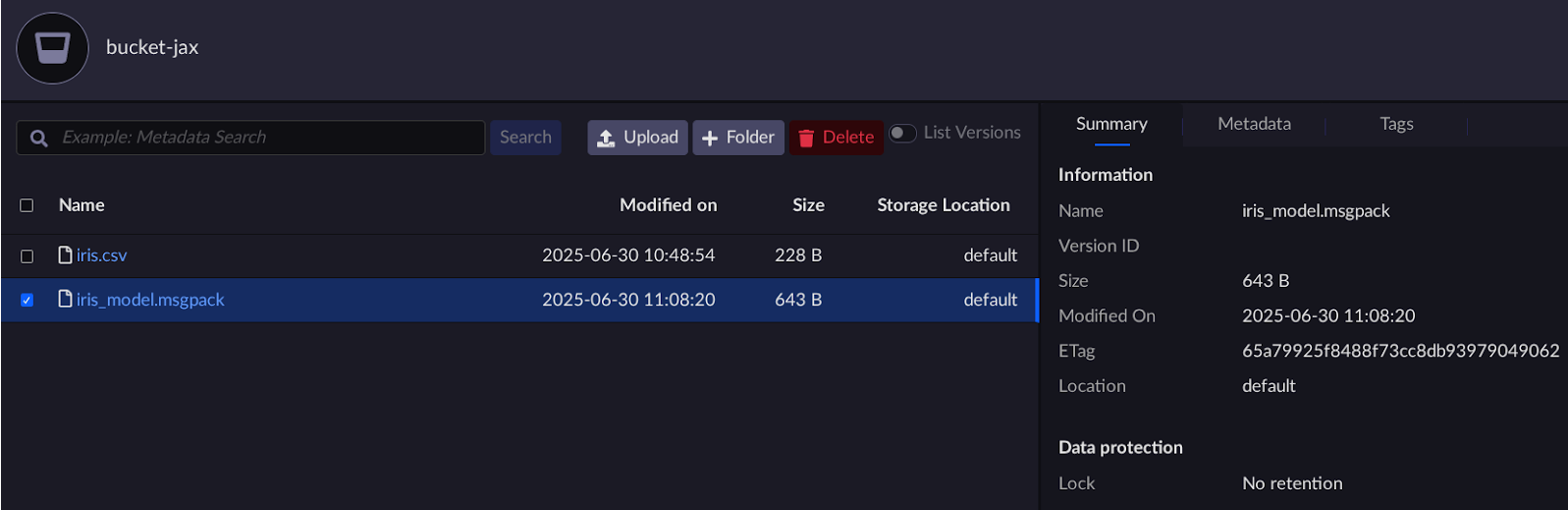
bucket-jaxbucket.Verify the
iris_model.msgpackfile exists.