

S3 Service Monitoring
Access the S3 Service Dashboards
In the ARTESCA UI, open the Data Management menu and select the Data Services tab, then click Advanced Metrics.
In Grafana, click Dashboards. Open the Data Services folder and click S3 service.
Monitoring Components
Overview

Metrics |
Description |
|---|---|
Up |
Number of S3 instances that are up and running. |
Http requests rate |
Rate of HTTP requests served. |
Success rate |
Percentage of successful/failing HTTP requests. |
Status 200 |
Rate of HTTP requests served successfully. |
Status 4xx |
Rate of HTTP requests which failed with a client error. |
Status 5xx |
Rate of HTTP requests which failed with a server error. |
Active Requests |
Number of HTTP requests currently being served. |
Injection Data Rate |
Average rate of data ingestion. It corresponds to the cumulative amount of data created (>0) or deleted (<0) per second. |
Injection Rate |
Average rate of object ingestion. It corresponds to the cumulative number of object created (>0) or deleted (<0) per second. |
OOB Injection Data Rate |
Average rate of data ingested out-of-band (OOB). It corresponds to the cumulative amount of OOB data created (>0) or deleted (<0) per second. |
OOB Injection Rate |
Average rate of objects ingested out-of-band (OOB). It corresponds to the cumulative number of OOB objects created (>0) or deleted (<0) per second. |
Buckets |
Number of S3 buckets available in the cluster. This value is computed asynchronously. Its update can take up to one hour. |
Objects |
Number of S3 objects available in the cluster. This value is computed asynchronously. Its update can take up to one hour. |
Reporter |
Number of instances of Report Handler that are up and running (handles the reporting of object and bucket counts). |
Last Report |
Time elapsed since the last report. This delay indicates how “fresh” the Objects and Buckets values are. |
Response Codes

Metrics |
Description |
|---|---|
Http status code over time |
Number of HTTP requests grouped by return code. |
Aggregated status over time |
|
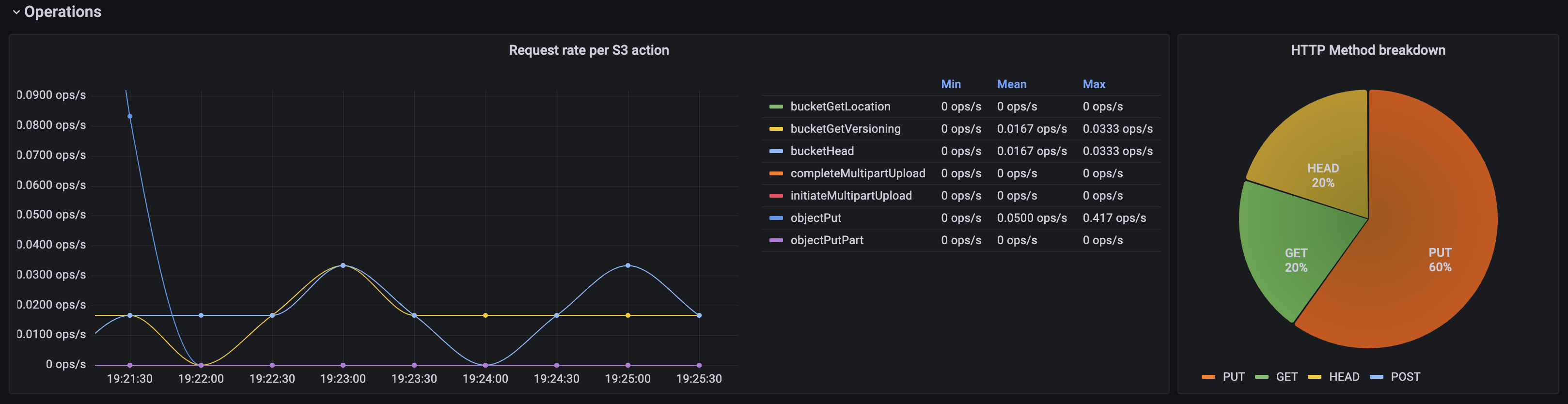
Operations
Metrics |
Description |
|---|---|
Request rate per S3 action |
S3 request rate per action. |
HTTP Method breakdown |
Request distributions per HTTP method. |
Latency

Metrics |
Description |
|---|---|
Average latencies |
Average latency per requests, over time.
|
Request time |
Time to process a request for each operation. The Y axis is the request duration. The scale uses the bucket list for that metric. A request with a duration “x” increments all the
buckets above that value.
A request with a duration of 347 ms increments
the buckets |
Latencies per S3 action |
Latency per S3 operation, over time. |
Data Rate

Metrics |
Description |
|---|---|
Bandwidth |
|
Avg upload chunk size by φ-quantile |
Average size of uploads for each quantile. Shows if the percentage of upload requests are ≤ to the size displayed. |
Avg download chunk size by φ-quantile |
Average size of downloads for each quantile. Shows if the percentage of download requests are ≤ to the size displayed. |


