

Relocation Monitoring
Access the Relocation Dashboards
In Grafana, click Dashboards. Open the xcore folder and click Storage Service / Relocation.
Monitoring Components

Metric |
Description |
|---|---|
Storage usage |
Reclaimable/used/available overview |
Number of queued relocations |
Extents waiting for relocation |
Number of relocations done in the last minute |
Extents relocated past minute |
Number of relocation errors in the past minute |
Extents that failed to be relocated in the past minute |
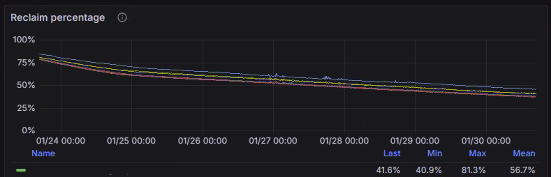
Metric |
Description |
|---|---|
Reclaim percentage |
Percentage of reclaims per extent |
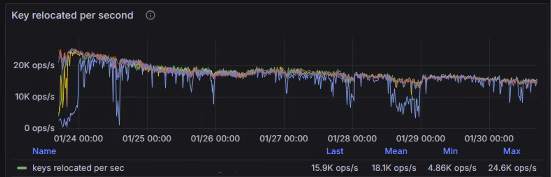
Metric |
Description |
|---|---|
Key relocated per second |
Numbers of keys deleted per server |
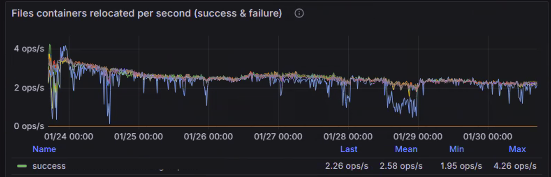
Metric |
Description |
|---|---|
Files containers relocated per second |
Numbers of files containers deleted per server |
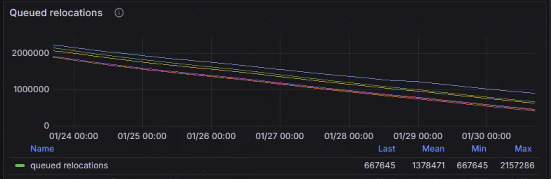
Metric |
Description |
|---|---|
Queued relocations |
Extents waiting to be replicated over time |
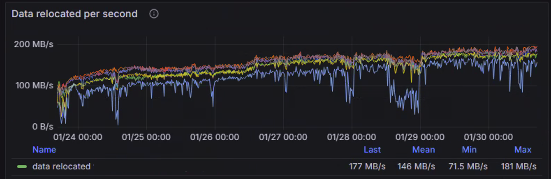
Metric |
Description |
|---|---|
Data relocated per second |
Speed of data in extent moved to another extent during relocation |
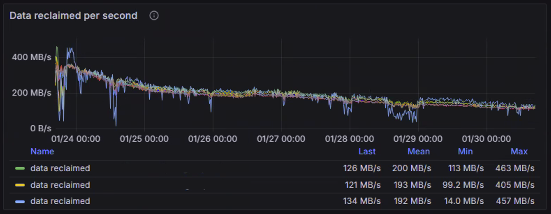
Metric |
Description |
|---|---|
Data reclaimed per second |
Speed of data in extent is deleted |
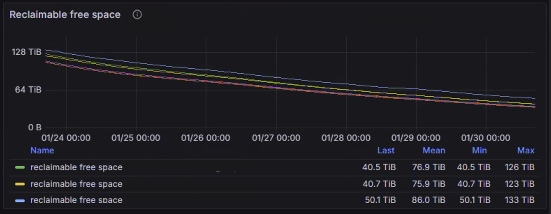
Metric |
Description |
|---|---|
Reclaimable free space |
Space available for recovery through relocation |


