

Lifecycle Expiration Workflow
Overview
S3 Lifecycle Expiration aims at freeing up storage space and thus, reducing ongoing costs associated with storage utilization. It is implemented through setting a lifecycle policy which automates the management of objects within your S3 buckets.
The expiration lifecycle policy defines when objects should be deleted. Within the lifecycle policy, S3 expiration actions provide the capability to permanently eliminate non-current versions of S3 objects or permanently delete objects that have expired in the past.
Lifecycle Expiration configuration is set at bucket level and applies immediately to the objects contained in the bucket, both existing objects and those that you add later. It is composed of two main elements:
A filter that enables you to target certain objects.
A time span that triggers the removal of objects that correspond to the filtering rules.
For example, if you set a configuration rule with an expiration action
that causes objects, within the filtering rule, to expire 30 days after
creation, the system will queue for removal, any existing, filtered objects
that are more than 30 days old.
Configuration
This section provides a detailed procedure to configure Lifecycle Expiration workflows.
Operation
This section provides procedures to operate Lifecycle Expiration workflows.
Monitoring and Troubleshooting
This section provides information on monitoring and troubleshooting Lifecycle Expiration workflows.
Technical Architecture
For a further understanding of the Lifecycle Expiration architecture and process, refer to the diagram below:
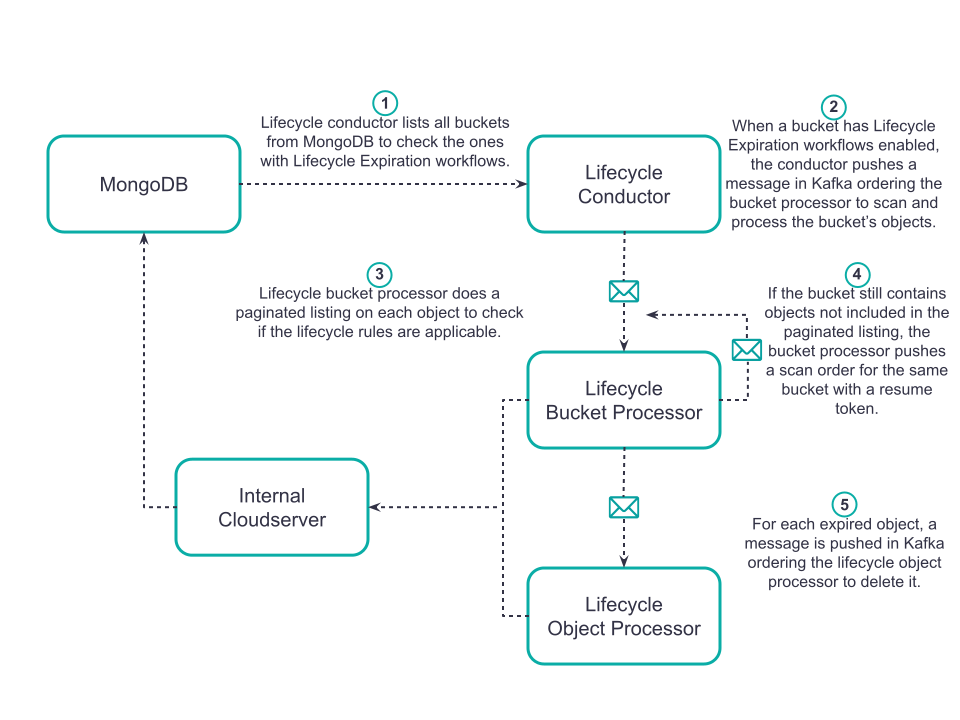
The following components enter in the making of Lifecycle Expiration:
Lifecycle Conductor
The conductor lists all available buckets and checks if they have Lifecycle Expiration workflows attached to them. Bucket are listed directly from MongoDB, so this is not an S3 operation.
By default, buckets are listed every 12 hours. The scan starts at 12:00 AM and 12:00 PM.
Note
You can modify this cron interval in specific cases only, for example to fix issues when the Lifecycle Conductor Cron Is Working too Fast.
The conductor pods are named artesca-data-backbeat-lifecycle-producer-{ID}.
Lifecycle Bucket Processor
The Lifecycle Conductor and Bucket Processor are shared between Transition/Expiration workflows. There is a single scan for both.
The bucket processor listens to the {ZENKO_ID}.backbeat-lifecycle-bucket-tasks topic,
and for each “bucket scan order” it does a paginated listing of the bucket (1000 objects
by default) to identify eligible objects. Workflow rules are then checked for each object
and Transition/Expiration actions are triggered accordingly.
When the bucket processor encounters an expired object,
it pushes a delete order into the {ZENKO_ID}.backbeat-lifecycle-object-tasks topic.
The bucket processor pods are named
artesca-data-backbeat-lifecycle-bucket-processor-{ID}.
Lifecycle Object Processor
The object processor deletes the expired objects.
It listens to the {ZENKO_ID}.backbeat-lifecycle-object-tasks
topic for deletion orders coming from the bucket processor.
The bucket processor pods are named
artesca-data-backbeat-lifecycle-object-processor-{ID}.
Internal Cloudserver
All Lifecycle S3 operations go through the Internal Cloudserver.
The main operations performed are:
List Objects: Performed by the bucket processor.
Head Object: Performed by the bucket processor and the object processor.
Get Bucket Versioning: Performed by the bucket processor.
Get Object Tagging: Performed by the bucket processor.
Delete Object: Performed by the object processor.


