

Create Asynchronous Metadata Updates from RING
Prerequisites
Enable XDM features after installing ARTESCA by running these commands sequentially.
[artesca-os@bootstrap ~]$sudo kubectl --kubeconfig=/etc/kubernetes/admin.conf patch zenkoui zenko-ui-cp -n zenko --type=merge --patch '{"spec":{"selfConfiguration":{"features":["XDM"]}}}'
[artesca-os@bootstrap ~]$sudo kubectl --kubeconfig=/etc/kubernetes/admin.conf patch zenkoui zenko-ui-wp -n zenko --type=merge --patch '{"spec":{"selfConfiguration":{"features":["XDM"]}}}'
RING, version 8.5.3.1 or later, installed with S3 Connector.
An S3C bucket with versioning enabled.
To set up Async Metadata updates, the elevated IAM policy listed below must be applied to the RING S3C IAM user. Refer to Manage IAM Policies for more information.
  {
    "Version": "2012-10-17",
    "Statement": [
        {
            "Action": "metadata:*",
            "Effect": "Allow",
            "Resource": "*"
        },
        {
            "Action": "s3:*",
            "Effect": "Allow",
            "Resource": "*"
        }
    ]
}
Procedure
From the main menu, choose Data Management. Click Data Browser from the side menu and select an account from the top drop-down list in the breadcrumb.

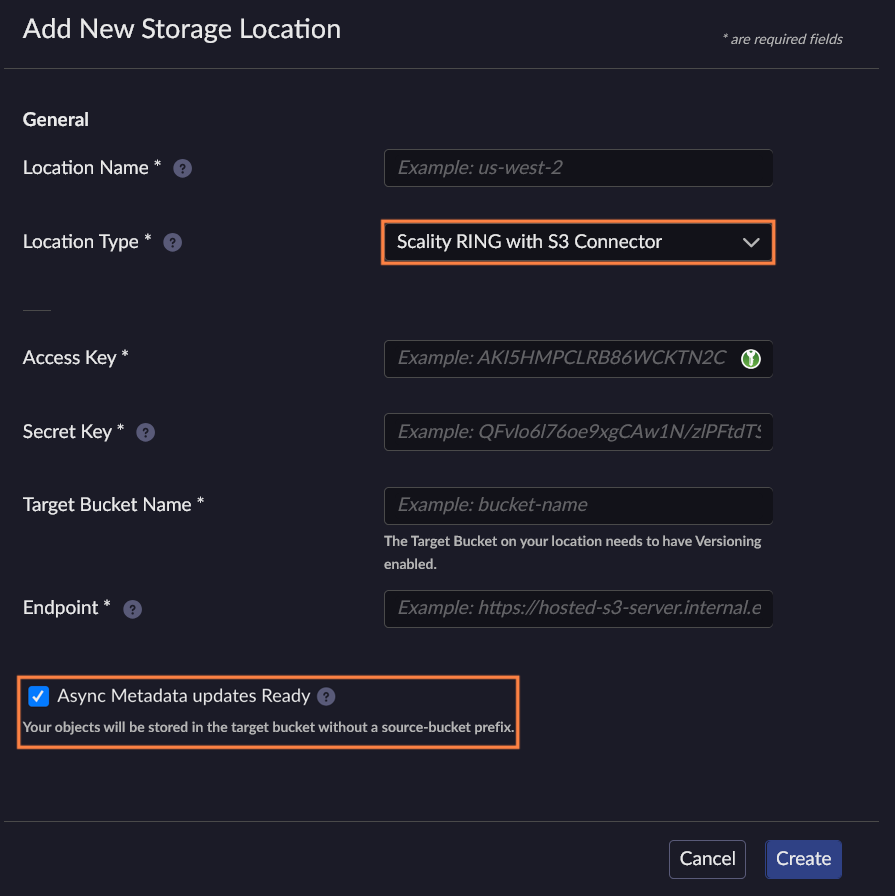
On the Locations page, click Create Location.

Select the location type Scality RING with S3 Connector and enable the Async Metadata updates Ready option.
Tip
If you enabled XDM features recently, you may have to wait a few minutes for the Async Metadata updates Ready option to display. If it is still not visible, refresh the browser tab.
Note
If the S3C endpoint uses HTTPS, make sure to include the port explicitly, for example
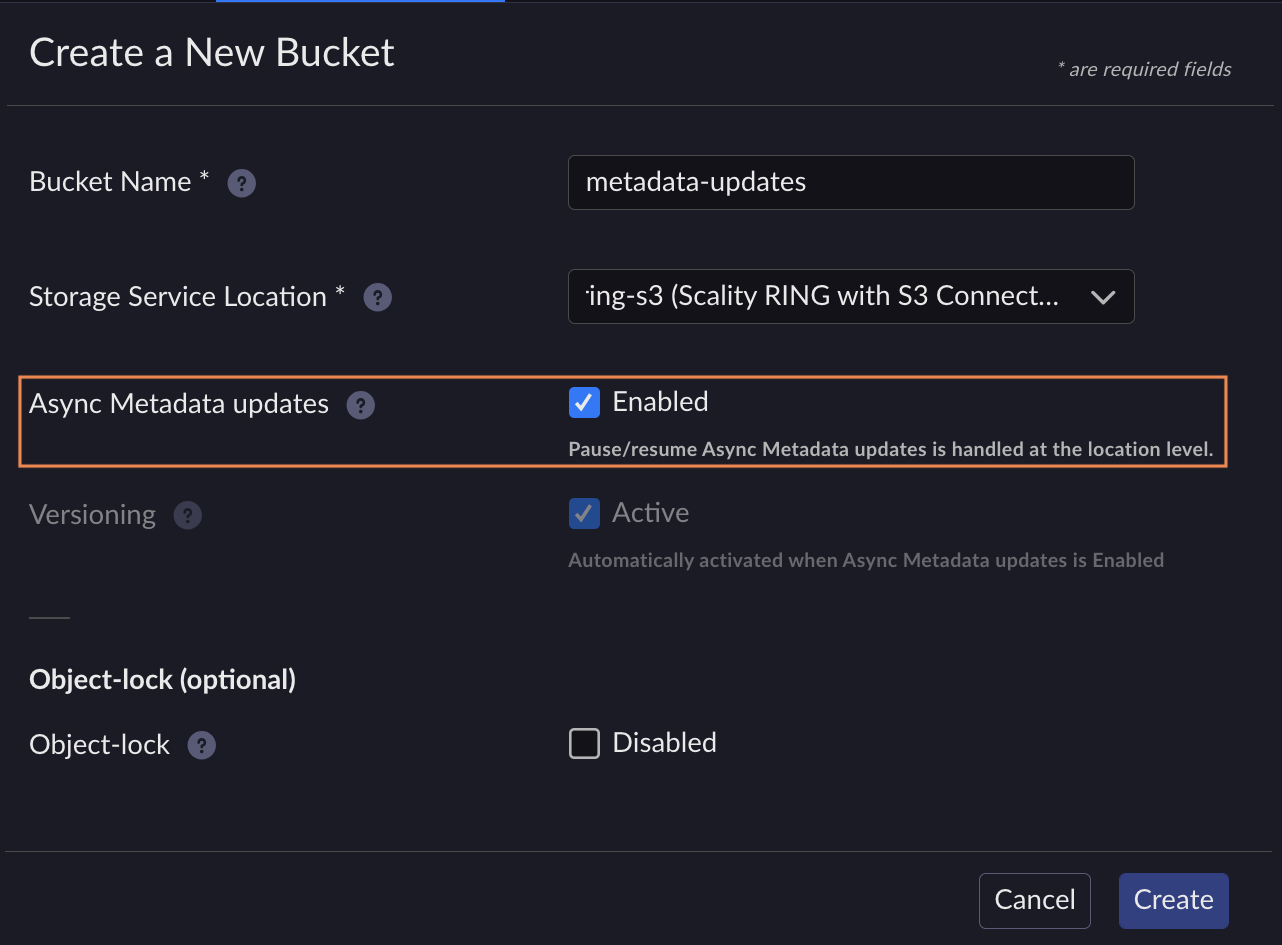
https://s3.example.com:443.Create a bucket on the storage location previously created and enable the Async Metadata updates option.
Note
Versioning is automatically enabled on the bucket when the Async Metadata updates option is enabled.
The bucket is created. By default, the Async Metadata updates workflow is paused.
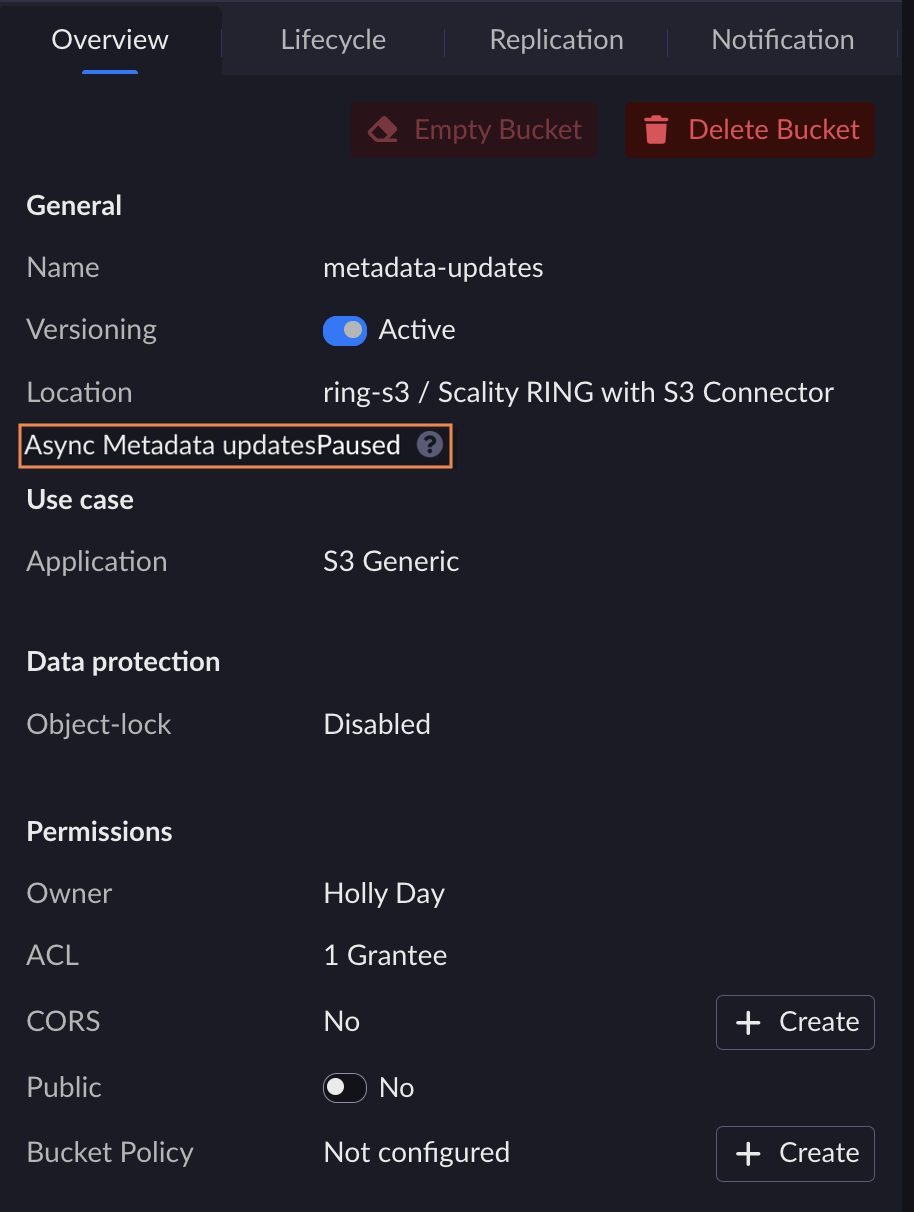
On the Locations page, select the storage location previously created and click the Resume button under the Workflow status column to activate the workflow.
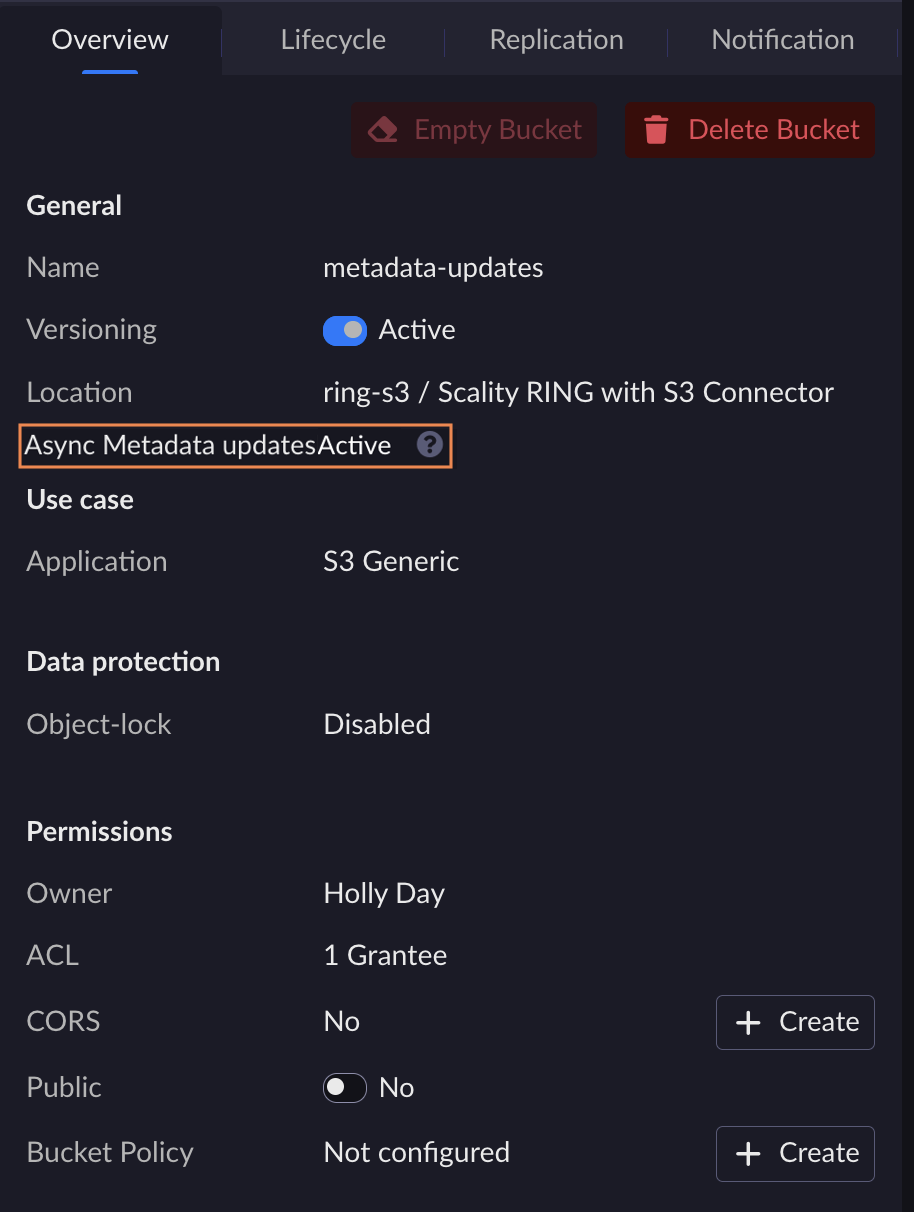
The location’s workflow status is now active.

View the bucket created. On the Overview tab, check that the Async Metadata updates status is set to Active.
This is a two-step process. You must first create a location, and then create the ingestion bucket within that location.
Create an S3 Location
Retrieve tokens and instance ID as described in Retrieve Access Tokens.
Create a location.
Set a location name.
[artesca-os@bootstrap ~]$LOCATION_NAME="<name of the location>"
Amazon S3 location is
location-aws-s3-v1.[artesca-os@bootstrap ~]$LOCATION_TYPE="location-aws-s3-v1"
Set the required credentials Access Key and Secret Key.
[artesca-os@bootstrap ~]$AWS_S3_ACCESS_KEY="<AWS user access key>" AWS_S3_SECRET_KEY="<AWS user secret key>"
Set the Amazon S3 target bucket name.
Note
This is the name of the versioning-enabled bucket in Amazon S3.
[artesca-os@bootstrap ~]$AWS_S3_BUCKET_NAME="<AWS S3 versioned bucket name>"
[artesca-os@bootstrap ~]$LOCATION_PARAMS=$( echo '{}' | jq -c " .name=\"${LOCATION_NAME}\" | .locationType=\"${LOCATION_TYPE}\" | .details.bucketMatch="false" | .details.accessKey=\"${AWS_S3_ACCESS_KEY}\" | .details.secretKey=\"${AWS_S3_SECRET_KEY}\" | .details.bucketName=\"${AWS_S3_BUCKET_NAME}\" | .details.region=\"us-east-1\" " )
Note
If you have changed the default domain of your ARTESCA installation, you must reflect that change in the following command.
[artesca-os@bootstrap ~]$curl -s -k -X POST \ -H "X-Authentication-Token: ${TOKEN}" \ -H "Content-Type: application/json" \ -d "${LOCATION_PARAMS}" \ "https://management.<base-domain-name>/api/v1/config/${INSTANCE_ID}/location" | \ jq '.'
Set a location name.
[artesca-os@bootstrap ~]$LOCATION_NAME="<name of the location>"
Scality RING with S3 Connector location is
location-scality-ring-s3-v1.[artesca-os@bootstrap ~]$LOCATION_TYPE="location-scality-ring-s3-v1"
Set the required credentials Access Key and Secret Key.
[artesca-os@bootstrap ~]$RING_ACCESS_KEY="<RING account or user access key>" RING_SECRET_KEY="<RING account or user secret key>"
Set the Scality RING with S3 Connector target bucket name.
Note
This is the name of the versioning-enabled bucket in Scality RING with S3 Connector.
[artesca-os@bootstrap ~]$RING_BUCKET_NAME="<RING versioned bucket name>"
Set Scality RING with S3 Connector endpoint.
[artesca-os@bootstrap ~]$RING_ENDPOINT="<Ring S3C endpoint>"
[artesca-os@bootstrap ~]$LOCATION_PARAMS=$( echo '{}' | jq -c " .name=\"${LOCATION_NAME}\" | .locationType=\"${LOCATION_TYPE}\" | .details.bucketMatch="true" | .details.accessKey=\"${RING_ACCESS_KEY}\" | .details.secretKey=\"${RING_SECRET_KEY}\" | .details.bucketName=\"${RING_BUCKET_NAME}\" | .details.endpoint=\"${RING_ENDPOINT}\" | .details.region=\"us-east-1\" " )
Note
If you have changed the default domain of your ARTESCA installation, you must reflect that change in the following command.
[artesca-os@bootstrap ~]$curl -s -k -X POST \ -H "X-Authentication-Token: ${TOKEN}" \ -H "Content-Type: application/json" \ -d "${LOCATION_PARAMS}" \ "https://management.<base-domain-name>/api/v1/config/${INSTANCE_ID}/location" | \ jq '.'
Set a location name.
[artesca-os@bootstrap ~]$LOCATION_NAME="<name of the location>"
Microsoft Azure Blob Storage location is
location-azure-v1.[artesca-os@bootstrap ~]$LOCATION_TYPE="location-azure-v1"
Set the required credentials Azure account name and Azure key.
[artesca-os@bootstrap ~]$AZURE_ACCOUNT_NAME="<Azure account name>" AZURE_KEY="<Azure key>"
Set the Microsoft Azure Blob Storage target container name.
[artesca-os@bootstrap ~]$AZURE_CONTAINER_NAME="<Azure container name>"
Set Microsoft Azure Blob Storage Blob service endpoint.
[artesca-os@bootstrap ~]$AZURE_ENDPOINT="<Azure Blob service endpoint>"
[artesca-os@bootstrap ~]$LOCATION_PARAMS=$( echo '{}' | jq -c " .name=\"${LOCATION_NAME}\" | .locationType=\"${LOCATION_TYPE}\" | .details.accessKey=\"${AZURE_ACCOUNT_NAME}\" | .details.secretKey=\"${AZURE_KEY}\" | .details.bucketName=\"${AZURE_CONTAINER_NAME}\" | .details.endpoint=\"${AZURE_ENDPOINT}\" " )
Note
If you have changed the default domain of your ARTESCA installation, you must reflect that change in the following command.
[artesca-os@bootstrap ~]$curl -s -k -X POST \ -H "X-Authentication-Token: ${TOKEN}" \ -H "Content-Type: application/json" \ -d "${LOCATION_PARAMS}" \ "https://management.<base-domain-name>/api/v1/config/${INSTANCE_ID}/location" | \ jq '.'
Create an Ingestion Bucket
Create the ingestion bucket using the following command. Replace <bucketName> with your bucket name,
and <locationName> with the location name you set in the previous step.
aws s3api create-bucket --bucket <bucketName> --create-bucket-configuration LocationConstraint=<locationName>:ingest


