

Bucket Notification
Configure the bucket notification feature to monitor events occurring in your bucket and route them to a specified destination. When setting up this feature, ensure you follow the established sizing guidelines to avoid issues.
Because notifications are processed asynchronously, events are queued immediately upon occurrence and delivered shortly after. If the notification configuration is disabled while events are still in the queue, those deliveries can be interrupted or canceled.
To set up bucket notifications, follow this workflow:
Review the sizing guidelines.
Configure a notification destination.
Configure S3 event notifications on individual buckets.
Configure Notification Destinations
To configure Kafka-based notification destinations at the cluster level, refer to the following procedures:
Configure S3 Event Notifications
ARTESCA provides a UI to configure S3 event notifications on individual buckets. These notifications send messages to an SQS queue when specified events occur.
Prerequisites
A bucket is created (refer to Create a Bucket for more information).
The sizing guidelines are respected.
A notification destination has been configured if using Kafka (refer to Configure Notification Destinations for more information).
Create a Notification Rule
From the main menu, choose Data Management. Click Data Browser from the side menu and select an account from the top drop-down list in the breadcrumb.

Select the bucket you want to view by clicking anywhere on the row but the bucket name.
In the Notification tab, click Add Notification.

The Create Bucket Notification page opens with a form to fill in the rule details.
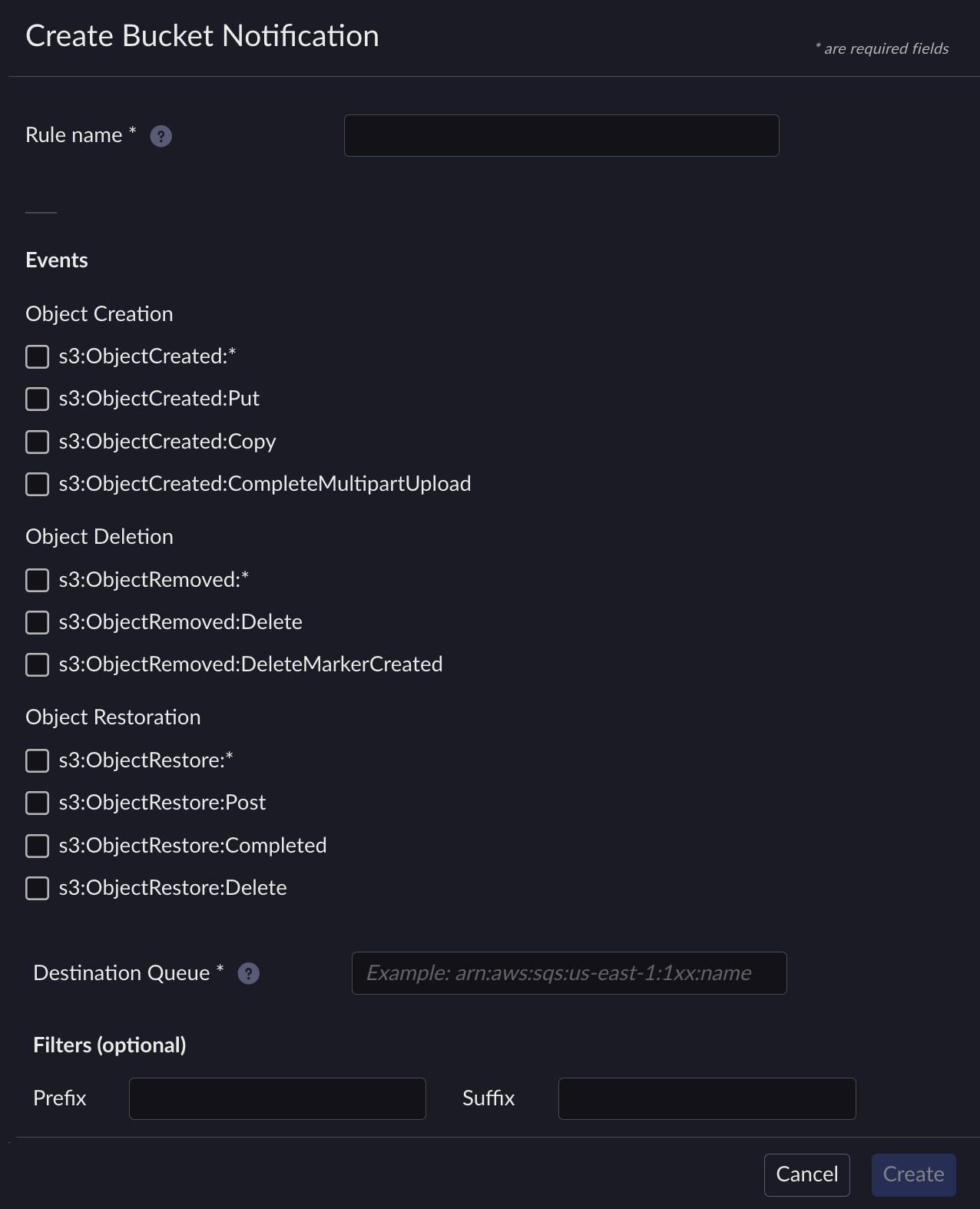
Fill in the following fields:
Rule Name: Enter a unique name for the notification rule.
Events: Select one or more event types to monitor:
s3:ObjectCreated:*– all object creation eventss3:ObjectCreated:Puts3:ObjectCreated:Copys3:ObjectCreated:CompleteMultipartUploads3:ObjectRemoved:*– all object deletion eventss3:ObjectRemoved:Deletes3:ObjectRemoved:DeleteMarkerCreateds3:ObjectRestore:*– all object restore eventss3:ObjectRestore:Posts3:ObjectRestore:Completeds3:ObjectRestore:Delete
Note
The
*wildcard matches all subtypes within an event category. For example,s3:ObjectCreated:*matchesPut,Copy, andCompleteMultipartUploadevents.Destination Queue: Enter the ARN of the SQS queue that receives the notifications (for example,
arn:aws:sqs:us-east-1:123456789012:my-queue).Prefix (optional): Filter notifications to objects with keys starting with the specified prefix.
Suffix (optional): Filter notifications to objects with keys ending with the specified suffix.
Click Create to save the notification rule.
Edit a Notification Rule
Navigate to the bucket you want to view.
In the Notification tab, click the Edit button on the row of the rule you want to edit.
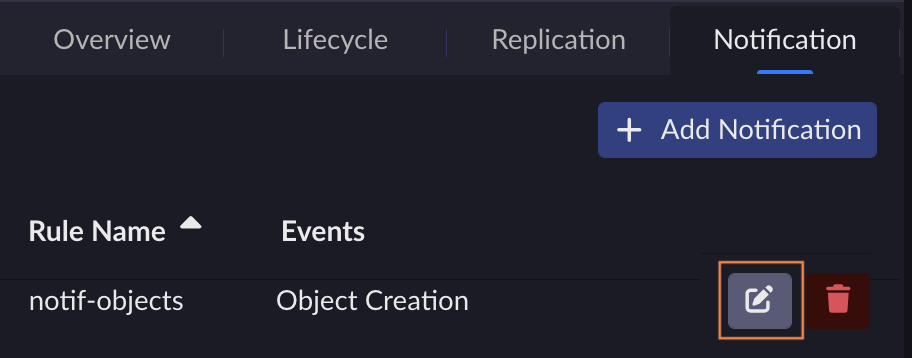
Edit the fields and click Save to commit changes.
Delete a Notification Rule
Navigate to the bucket you want to view.
In the Notification tab, click the Delete button on the row of the rule you want to delete.

Confirm the deletion in the dialog box.


