

View and Edit Bucket Information
ARTESCA UI offers the ability to view and edit some bucket information depending on the type of bucket. When you select a bucket, a tabbed interface appears with sections for bucket overview, lifecycle rules, replication rules, and notification rules.
Prerequisite
Before viewing or editing a bucket, you must have created one.
Tip
For more information, refer to the Create a Bucket section.
Procedure
From the main menu, choose Data Management. Click Data Browser from the side menu and select an account from the top drop-down list in the breadcrumb.

Select the bucket you want to view by clicking anywhere on the row but the bucket name.
The bucket view opens with the following tabs:
Overview: Displays bucket properties, data protection, and permissions. Refer to Understand the Overview Tab for more information.
Lifecycle: Lists lifecycle rules and allows creating or editing rules. Refer to Create Lifecycle Expiration Workflow for more information.
Replication: Lists replication rules and allows creating or editing rules. Refer to Create a Replication Workflow for more information.
Notification: Lists notification rules and allows creating or editing rules. Refer to Bucket Notification for more information.
Understand the Overview Tab
The Overview tab is organized in different sections to display bucket information and settings.
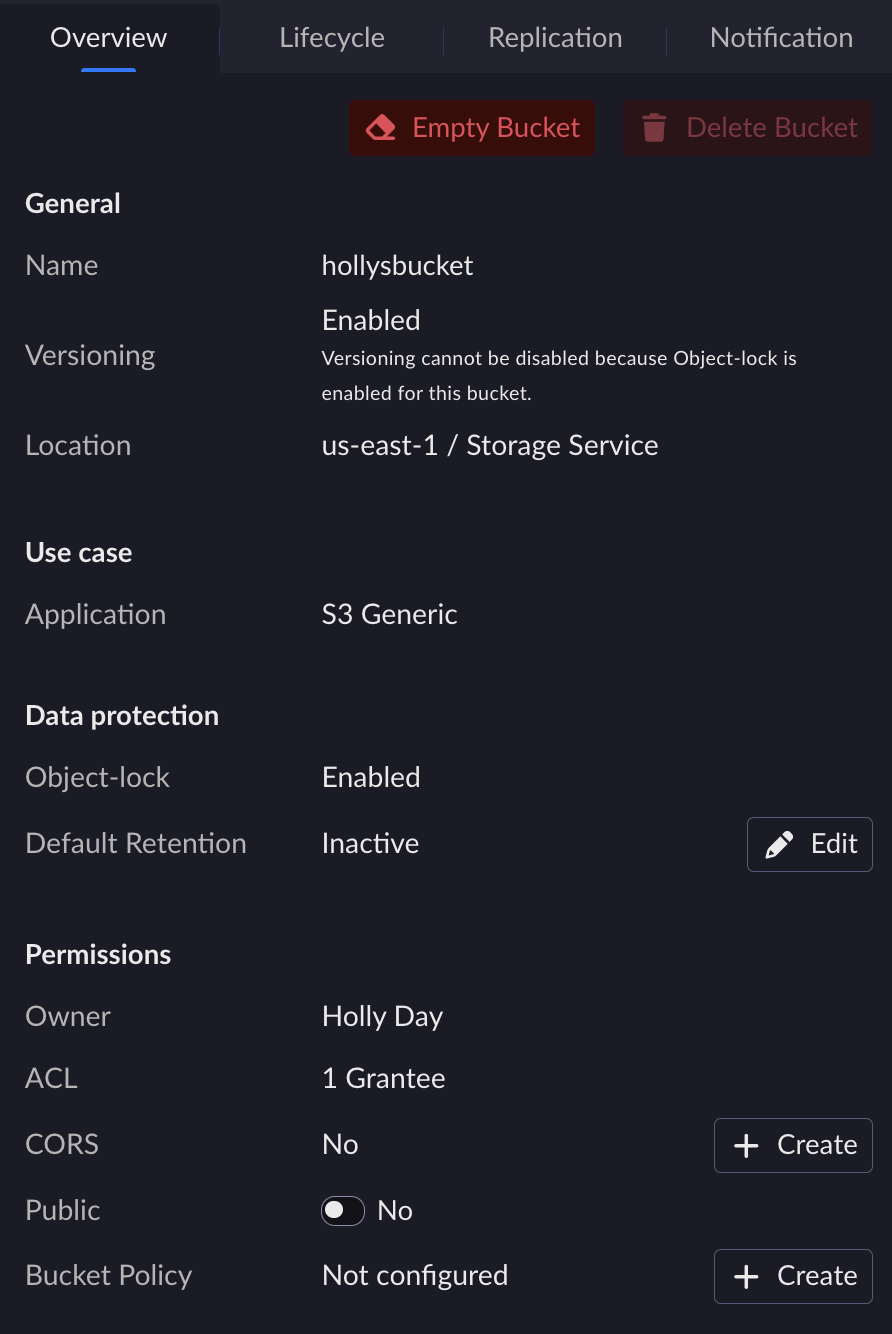
General
This section displays general information about the bucket.
Name: The bucket name.
Versioning: The current versioning status. Possible versioning statuses are Active, Suspended, or Inactive for buckets without object-lock, and Enabled or Disabled for buckets with object-lock.
Location: The storage location associated with the bucket.
Use Case
This section displays the application associated with the bucket.
Data protection
This section is always visible. For buckets without object-lock, it displays Object-lock: Disabled.
Object-Lock: Indicates whether object-lock is enabled or disabled.
Default Retention: Displays the default retention mode (Governance or Compliance) and period. Click the edit button to modify the default retention settings.
Permissions
This section displays permissions-related information and settings.
Owner: The bucket owner.
ACL: The access control list status.
CORS: Indicates whether CORS rules are configured.
Public: Toggle to control whether the bucket is publicly accessible.
Bucket Policy: Indicates whether a bucket policy is configured.
From the Overview tab, you can also:
Empty the bucket by clicking the Empty Bucket button.
Delete the bucket by clicking the Delete Bucket button.
Tip
For more information on versioning, refer to the Amazon S3 documentation. ARTESCA UI implements S3 logic for versioning.


