

Generate a Pre-Signed URL
A pre-signed URL provides temporary access to a specific object without requiring authentication credentials. The URL expires after a configurable duration, up to a maximum of seven days.
To generate a pre-signed URL, follow these steps:
From the main menu, choose Data Management. Click Data Browser from the side menu and select an account from the top drop-down list in the breadcrumb.

Click the bucket’s name to view its objects.
Select an object by clicking its row to view its information.
On the Summary tab, in the Access section, click Get pre-signed url.

In the dialog box, set the expiration duration:
Days: Enter a value between 0 and 7.
Hours: Enter a value between 0 and 23.
Minutes: Enter a value between 0 and 59.
Note
The maximum duration is seven days. When Days is set to 7, the Hours and Minutes fields are disabled.
The Access ends on field displays the calculated expiry date and time.
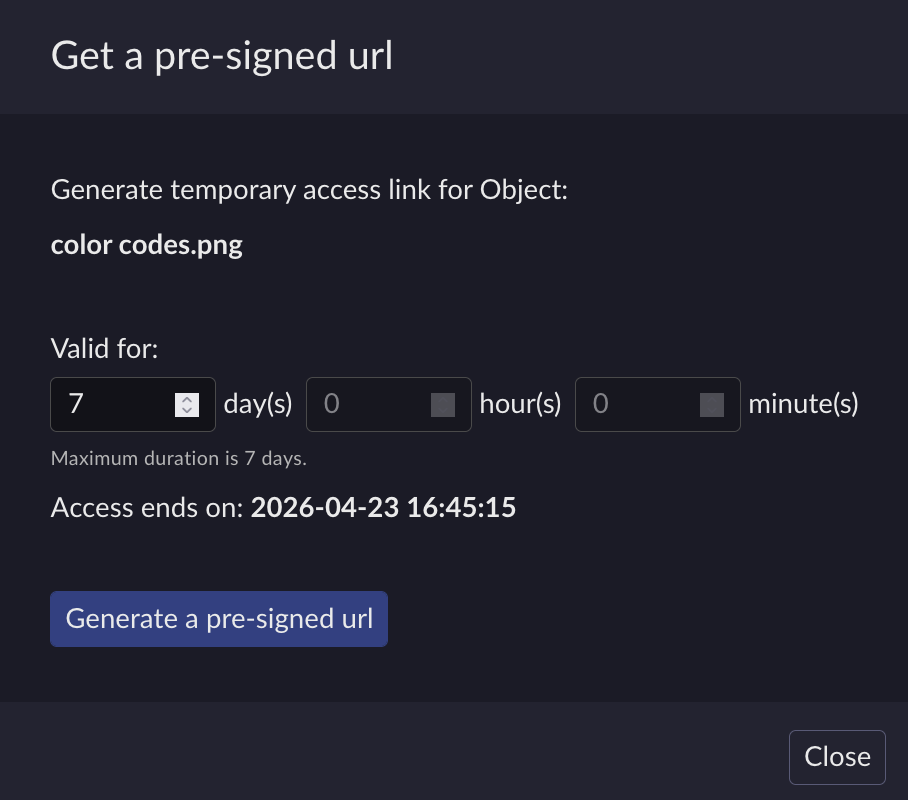
Click Generate a pre-signed url.
The generated URL appears in a read-only text field.
Use the copy button to save the URL to your clipboard.
Click Close to dismiss the dialog box.


