

Default ARTESCA Roles
You can use the AssumeRoleWithWebIdentity API to assume, for a given
period of time, a role granting specific permissions
within the different services. These specific permissions are detailed
in a pre-seeded policy.
The default IAM roles available are described below.
StorageManager Role
Important
This role can only be assumed by an ARTESCA user with the StorageManager admin role.
The StorageManager IAM role grants the user all permissions and full access to
the account’s resources.
Use this role to manage ARTESCA users.
StorageAccountOwner Role
The StorageAccountOwner role represents the account’s owner. With this role, the user
can manage one or several accounts and the full IAM console
(Manage IAM Policies, Manage IAM Users, Manage IAM Roles, Manage IAM Groups).
Use this role to edit the rights of the default roles DataConsumer and
StorageManager, and to create additional non-default IAM roles using the
standard APIs.
Warning
To avoid privilege escalation risks, make sure that the additional non-default IAM roles created have the right policies configured. Refer to IAM Role Operations for more information on role creation and policies.
The following pre-seeded policy is attached to the StorageAccountOwner role:
{
    "Version": "2012-10-17",
    "Statement": [
        {
            "Sid": "FullAccess",
            "Effect": "Allow",
            "Action": [
                "s3:*",
                "iam:*"
            ],
            "Resource": [
                "*"
            ]
        }
    ]
}
DataConsumer Role
The DataConsumer role grants the user read and write access to
S3 Buckets such as: object management and tagging,
Metadata Search, retention parameters, and workflows (Replication, Transition,
Expiration). The user cannot create or delete buckets and does not have
access to the IAM console, unlike the StorageAccountOwner role.
The following pre-seeded policy is attached to the DataConsumer role:
{
  "Statement": [
    {
      "Action": [
        "s3:ListAllMyBuckets",
        "s3:ListBucket",
        "s3:GetBucketLocation",
        "s3:MetadataSearch",
        "s3:PutObject",
        "s3:PutObjectAcl",
        "s3:GetObject",
        "s3:GetObjectAcl",
        "s3:DeleteObject",
        "s3:RestoreObject",
        "s3:GetBucketVersioning",
        "s3:GetBucketCors",
        "s3:GetBucketAcl",
        "s3:GetBucketObjectLockConfiguration",
        "s3:PutBucketObjectLockConfiguration",
        "s3:ListObjectsV2",
        "s3:ListObjectVersions",
        "s3:DeleteObjects",
        "s3:GetObjectRetention",
        "s3:GetObjectLegalHold",
        "s3:PutObjectRetention",
        "s3:PutObjectLegalHold",
        "s3:HeadObject",
        "s3:CopyObject",
        "s3:GetObjectTagging",
        "s3:PutObjectTagging",
        "s3:DeleteObjectTagging",
        "s3:GetReplicationConfiguration",
        "s3:PutReplicationConfiguration",
        "s3:GetLifecycleConfiguration",
        "s3:PutLifecycleConfiguration",
        "s3:ListObjectVersions",
        "s3:GetObjectVersion",
        "s3:DeleteObjectVersion",
        "s3:GetObjectVersionTagging",
        "s3:DeleteObjectVersionTagging",
        "s3:PutObjectVersionTagging",
        "s3:GetObjectVersionAcl",
        "s3:PutObjectVersionAcl",
        "s3:GetBucketTagging",
        "s3:PutBucketTagging",
        "s3:DeleteBucketTagging",
        "sur:Get*"
      ],
      "Effect": "Allow",
      "Resource": "*"
    }
  ],
  "Version": "2012-10-17"
}
StorageUsageConsumer Role
Important
This role can be assumed by an ARTESCA user with either the StorageManager
or the StorageUsageReporter admin role.
The storage-usage-consumer-role IAM role provides read-only access to storage
usage metrics via the Scality Utilization Reporting (SUR) API. It is pre-seeded
in every account and is used internally by the Storage Usage Reporting API to collect
usage data for each account, broken down by location.
This role is deliberately minimal, granting only the sur:GetMetrics
permission needed to read usage data. It does not grant access to any S3,
IAM, or other operations.
The following pre-seeded policy is attached to the storage-usage-consumer-role:
{
    "Version": "2012-10-17",
    "Statement": [
        {
            "Sid": "StorageUsageConsumerAccess",
            "Effect": "Allow",
            "Action": [
                "sur:GetMetrics"
            ],
            "Resource": "*"
        }
    ]
}
Assign IAM Roles to ARTESCA Users
Note
Only IAM roles with sts:AssumeRoleWithWebIdentity can be attached to an ARTESCA user.
Select Identity from the main menu, then select Users.

Select a user from the table, then select the IAM Roles tab.
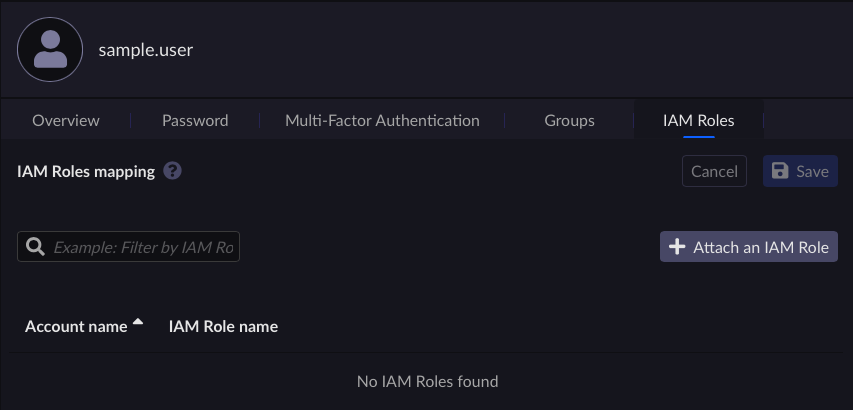
Click Attach IAM Role.
Select an account from the drop-down list.
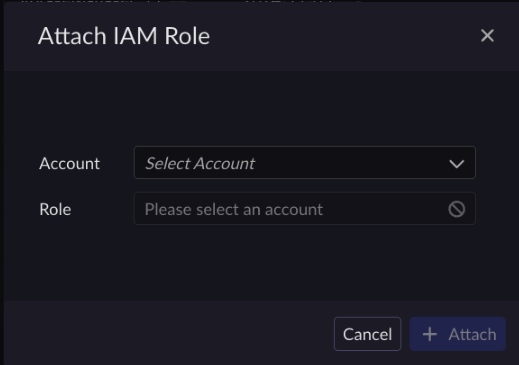
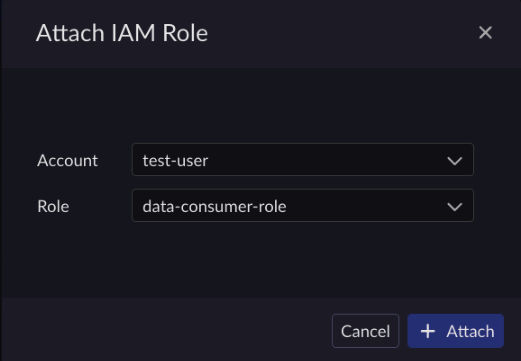
Select a role from list, then click Attach. The IAM role is now attached to the user.
Note
The drop-down list contains the roles available. There are several predefined roles which include: storage-manager-role, storage-account-owner-role, data-consumer-role, and storage-usage-consumer-role.
Inheriting IAM Roles Through Group Membership
Users can inherit IAM roles through group membership. Inherited roles will appear in the IAM role table but cannot be removed by the active user. The UI indicates that the role is acquired through group membership inheritance.


