

Create an S3 Endpoint
Click Data Management on the top menu.
From the Data Services page, click Create Data Service to open the Create a New Data Service dialog box.

Enter a hostname (
<DNS-resolvable FQDN>) and select a location from the Storage Location drop-down menu.Important
When this endpoint is used, the location associated with it will be attached to the buckets created and the objects stored in it, unless another location is specified during the bucket creation or object-upload.
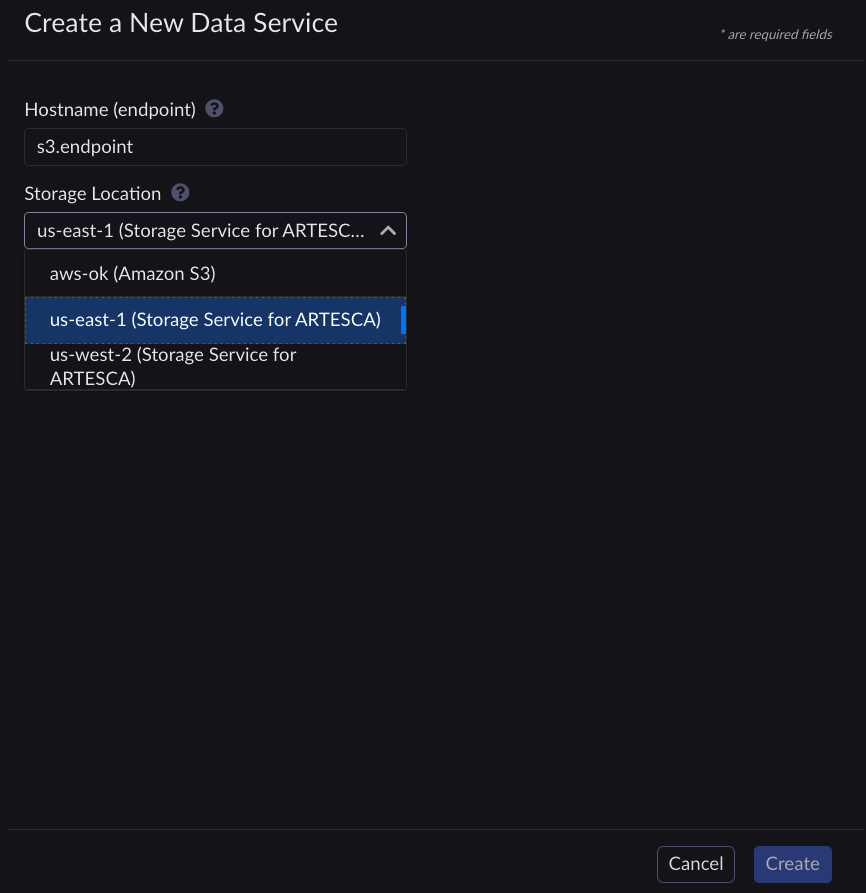
Click Create. The Deploying Data Service message displays.
Wait for the Deploying Data Service message to disappear and check that the created endpoint is listed.

Retrieve tokens as described in Retrieve Access Tokens.
Define a hostname. For more information refer to:
Important
To avoid DNS issues you must use flat hostnames such as
storage001and avoid compound hostnames suchs001.storage.ENDPOINT_HOSTNAME="hostname"
Define storage location. For more information refer to Add a Storage Location.
LOCATION_NAME="location"
Issue the following variable declarations and commands.
Note
If you have changed the default domain of your ARTESCA-installation, you must reflect that change in the following command.
[artesca-os@bootstrap ~]$ENDPOINT_PARAMS=$( echo '{}' | jq -c " .hostname=\"${ENDPOINT_HOSTNAME}\" | .locationName=\"${LOCATION_NAME}\" " ) curl -s -k -X POST \ -H "X-Authentication-Token: ${TOKEN}" \ -H "Content-Type: application/json" \ -d "${ENDPOINT_PARAMS}" \ "https://management.<base-domain-name>/api/v1/config/${INSTANCE_ID}/endpoint" | \ jq '.'


