

Nasuni Performance Tuning
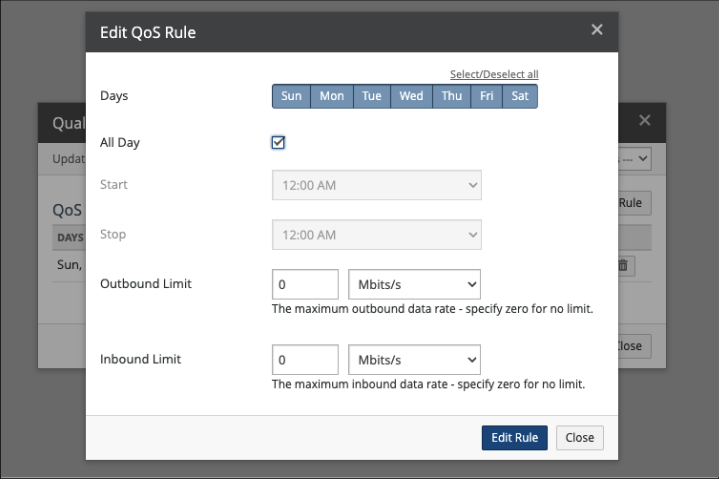
Quality of Service (QoS)
Default: 10Mib/s
Recommended: Unlimited (Enter 0 for Unlimited)
Location: In the Nasuni Management Console, navigate to Filers -> Filer Settings -> Quality of Service
In Nasuni, QoS settings control how bandwidth is used between the Nasuni Edge Appliance (NMC / Filer) and ARTESCA.
To ensure that cloud I/O (uploads, downloads, snapshots, recalls) does not saturate the WAN link and negatively affect production traffic when offloading data to ARTESCA, QoS is utilized. For optimal offload performance, an Unlimited setting is recommended.
Chunk Size
Default:
1MiB if file size is <1GiB
2MiB if file size is > 1GiB and the edge filer has < 16MiB RAM
10MiB if file size is > 1GiB and the edge filer has 16MiB or greater RAM
Recommended: 4MiB
Location: In the Nasuni Management Console, navigate to Volumes -> Volume Settings -> Cloud I/O. Select the volume that’s connected to ARTESCA and update the Chunk Size value.
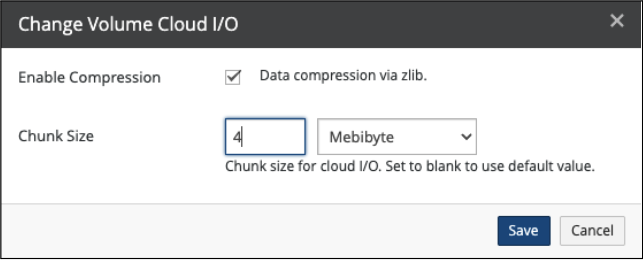
Chunk size is the size of the data pieces Nasuni breaks a file into before storing it as objects in ARTESCA. Chunks are compressed before being written to ARTESCA, usually achieving about 50% compression on the selected file size on average. Optimally sized chunks size ensures predictable performance between Nasuni and ARTESCA.


